
Migrating Depot Repair SR Parts from EBS to Fusion Cloud
Migrating transactional data from Oracle E-Business Suite (EBS) to Oracle Fusion Cloud often involves standard tools like Import Management or File-Based Data Imort (FBDI) Templates. However, the migration of Depot Repair Service Request (SR) Parts presents a unique and complex challenge. Unlike other data entities, Oracle does not provide a standard template, spreadsheet import option, or a single end-to-end REST API for SR Parts. This gap requires a specialized approach to ensure a successful transition.

For organizations that rely on depot repair services, this migration is not just a technical task—it is a critical business process. A failure to properly transfer this data can disrupt service operations, impact customer satisfaction, and create significant data integrity issues. Successfully navigating this conversion demands a deep understanding of both EBS and Fusion Cloud architectures, alongside a robust technical solution.
This post will detail the complexities of SR Parts migration, outline the key challenges encountered, and present a proven, automated framework for moving this critical data from Oracle EBS to Oracle Fusion Cloud.
Understanding the Challenge: What are SR Parts?
When a customer raises a Service Request (SR) for the repair, replacement, or maintenance of a product, any physical components linked to that request are known as SR Parts. These components are fundamental to tracking the service lifecycle, managing inventory, and ensuring accurate billing.
SR Parts are generally categorized into two main types:
- Depot Repair (Return & Repair): In this scenario, a customer returns a defective part to the organization. The organization then repairs or refurbishes the item, and the repaired part is shipped back to the customer. This process involves both a Return Material Authorization (RMA) and a shipment transaction. A common example is a customer sending a faulty laptop motherboard to a service center for repair.
- Non-Depot (Service-Only / Field Service): This process involves shipping or consuming a part during a service event without a corresponding return and repair cycle. There is no direct dependency between a return and a shipment. Examples include a field technician installing a new hard drive at a customer’s site or a company providing a temporary loaner laptop while the customer’s device is being serviced.
Why SR Parts Migration Is Not Straightforward
The core difficulty in migrating SR Parts stems from fundamental architectural differences between Oracle EBS and Oracle Fusion Cloud. In EBS, both depot and non-depot SR Parts follow a single, unified workflow and are created through a consolidated architecture.
Oracle Fusion Cloud, however, introduces a more segmented model. It maintains two separate architectures: one specifically for Depot Repair and another for Non-Depot SR Parts. Consequently, you cannot migrate all EBS SR Parts into Fusion using a single method. Each part must first be segregated and then processed according to its corresponding flow in Fusion Cloud. This architectural divergence creates several significant migration challenges.
Key Migration Challenges Explained
Attempting to migrate SR Parts without a tailored strategy will lead to roadblocks and data inconsistencies. The primary obstacles include:
- No Standard Data Migration Tools: Oracle Fusion Cloud does not offer an FBDI template, Import Management utility, or spreadsheet loader for SR Parts. This absence eliminates traditional file-based loading methods, forcing a reliance on more technical solutions.
- Lack of a Single End-to-End API: While EBS allows SR Part creation from a single screen, Fusion Cloud requires a sequence of multiple, dependent REST API calls. The specific sequence and validation rules change depending on whether the part is for depot or non-depot repair.
- System-Generated Order Numbers: Fusion Cloud automatically generates new order numbers for SR Parts and does not permit overriding this with legacy data. The original EBS order numbers cannot be migrated as-is, creating a potential traceability gap.
- Derived Order Status: The status of an SR Part order in Fusion Cloud is derived automatically through its orchestration rules. This means the historical status values from EBS cannot be directly migrated.
- Asset Validation Rules: Fusion Cloud enforces strict validation, preventing end-dated or inactive assets from being linked to new SR Parts. Any legacy records associated with such assets must be filtered out.
A Proven Solution Strategy for SR Parts Migration
To overcome these obstacles, a multi-step, automated strategy is required. Apps Associates created this solution for a customer facing this challenge. This approach focuses on aligning the legacy EBS data with Fusion Cloud’s modern architecture rather than attempting to force-fit old processes into a new system.
Step 1: Segregate SR Parts into Depot vs. Non-Depot
The foundational step is to analyze and categorize all historical SR Parts from EBS. Each part must be classified as either “Depot Part” (where return and shipment are linked) or “Non-Depot Part” (where no link exists). This segregation is essential for directing the data through the correct architectural path in Fusion Cloud.
Step 2: Build an Automated Migration Framework Using REST APIs
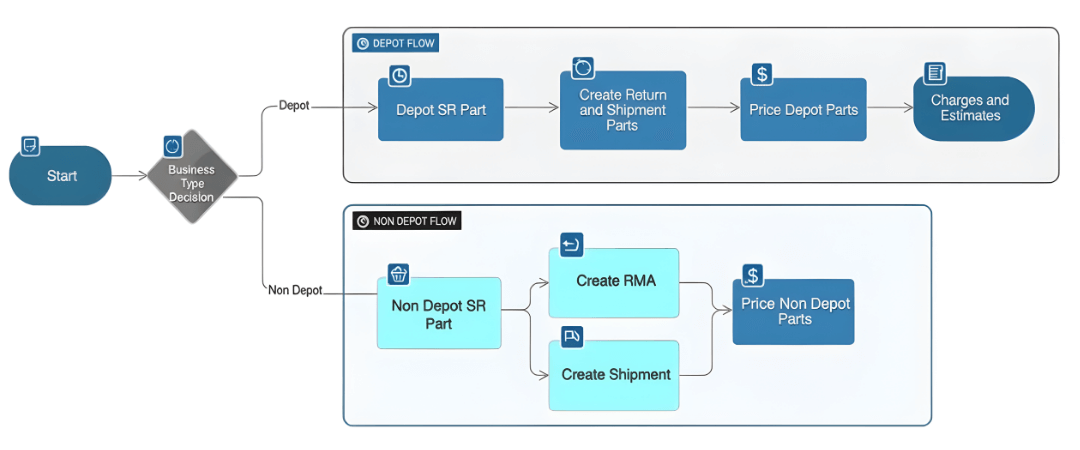
With the data properly classified, the next step is to build an automated migration process using a sequence of REST APIs. Because the API calls differ for depot and non-depot parts, two separate automation flows are developed.
- Depot SR Part Flow: This sequence handles the creation of RMAs, repair orders, and shipment orders in a linked manner.
- Non-Depot SR Part Flow: This flow manages the creation of service charges, debriefs, and shipment orders as independent transactions.
Throughout each flow, business rules and validations are embedded at every step. This ensures the data is processed in the correct sequence and meets all of Fusion Cloud’s requirements, which prevents conversion failures and data corruption.
Step 3: Ensure Traceability with Cross-Reference Mapping
To maintain a clear audit trail, it is crucial to address the system-generated identifiers in Fusion Cloud. The solution involves capturing the new, cloud-generated values (such as repair number, order number, and status) and mapping them back to their original EBS counterparts. Legacy identifiers, like the EBS order number, are stored in descriptive flexfields or reference attributes within Fusion. This cross-reference mapping ensures full end-to-end traceability between the legacy and cloud systems.
The Results: A Seamless and Accurate Migration
By implementing this automated, API-driven framework, organizations can achieve what standard tools cannot. The key outcomes of this approach are significant:
- Successful Migration: SR Parts are successfully migrated to Oracle Fusion Cloud despite the lack of any FBDI template or standard import option.
- Adherence to Cloud Architecture: The migration strictly follows Fusion Cloud’s architectural rules, resulting in a clean and sustainable implementation.
- Full Traceability: Complete visibility into legacy transactions is maintained through robust cross-reference mapping.
- Complete Automation: The process requires no manual intervention, reducing the risk of human error and increasing efficiency.
Migrating Service Request Parts from EBS to Oracle Fusion Cloud is a complex undertaking that requires more than just technical skill. It demands a strategic approach grounded in a deep functional understanding of depot repair processes and the architectural nuances of both platforms. By classifying data correctly, orchestrating REST APIs in the proper sequence, and ensuring full traceability, organizations can achieve a clean, accurate, and fully automated conversion.
At Apps Associates, we specialize in solving complex Oracle Cloud migration challenges. Our global team of experts has designed and implemented custom solutions like this for clients around the world, ensuring a smooth and successful transition from EBS to Fusion Cloud. If you are facing a complex data conversion, contact us to learn how our proven methodologies can help you achieve your goals. Visit us at www.appsassociates.com for more information.