Microsoft Fabric: Turning Disconnected Retail Data Into a Trusted Analytics Foundation
Most retailers don’t lack data. They lack consistency. Sales sit in one system, inventory in another, and customer complaints in a third. The result is conflicting dashboards and meetings that start with debate instead of decisions.

Microsoft Fabric solves this by uniting ingestion, storage, transformation, modeling, and reporting in one platform. By landing data in OneLake, structuring it with the medallion architecture (Bronze, Silver, and Gold), and building a dimensional model in the Fabric Data Warehouse, retailers create a single source of truth. Power BI then consumes that curated data without rewriting business logic.
The payoff: repeatable reporting, consistent metrics across teams, and leaders who spend meeting time deciding rather than disputing.
A Familiar Monday Morning
It’s the first Monday of the month. A retail leadership team is preparing for a performance review. The questions are straightforward:
- How did we perform online and in-store?
- Do we have inventory where demand is rising?
- What are customers complaining about, and is it getting better?
And yet, the meeting starts the way it often does, not with decisions, but with debate. Two dashboards disagree. The spreadsheet looks different from last week. Someone asks the question everyone dreads: “Which number is the right one?”
What this means: The problem isn’t the dashboard. It’s the disconnected data feeding it.
The Real Problem Isn’t the Dashboard
Most modern retailers aren’t short on data. They’re short on consistency. The truth is scattered across systems built for operations, not analytics:
- Store operations data in a transactional database
- E-commerce transactions in an online commerce platform
- Inventory in a warehouse management system (WMS)
- Customer service tickets in a third-party support tool
Individually, each system works. Collectively, they create friction. The analyst’s job becomes a monthly ritual of extraction, cleansing, mapping, and reconciliation, often in spreadsheets.
What Are Analysts Really Doing Every Month?
To deliver one consolidated report, analysts typically have to:
- Pull data from multiple sources, often with different refresh cycles.
- Clean and standardize fields such as dates, currencies, product codes, and channel names.
- Conform identifiers (customer, product, store, and SKU) across systems.
- Explain why teams see different totals due to mismatched definitions.
None of that work is inherently bad. It’s just brittle and repetitive. And because it happens downstream, it tends to get re-implemented, slightly differently, in every new report.
A Different Approach: Build a Governed Foundation Once
This is where a Lakehouse approach helps. The goal is simple: create a single, governed data foundation that can serve every analytics and reporting need without rewriting business logic for each dashboard.
What Is Microsoft Fabric?
Microsoft Fabric is an end-to-end analytics platform that brings the full data lifecycle into one unified environment. It supports this governed-foundation pattern by combining:
- Ingestion and orchestration to move data on a schedule
- Unified storage through OneLake
- Lakehouse organization and transformation for structuring data
- Warehouse-style modeling for relationships and metrics
- Power BI for consumption
By consolidating these capabilities, Fabric removes the seams between separate tools, where inconsistencies usually creep in.
How to Implement the Retail Use Case in Microsoft Fabric
The following five steps walk through how disconnected retail data becomes a trusted analytics foundation.
Step 1: Ingest From Source Systems
Start by connecting to operational sources and landing data on a predictable schedule. In Fabric, you typically handle this with Data Factory capabilities, so ingestion becomes repeatable, not a monthly scramble.
What Are the Common Ingestion Options in Fabric?
| Ingestion Method | Description |
| Copy Job | Low- or no-code tool similar to ADF Copy Activity for moving data from multiple sources to Fabric destinations. Supports full and incremental loads with scheduling. |
| Dataflow Gen2 | Power Query–based, low-code solution for transforming and ingesting data from hundreds of sources with high performance. |
| Pipeline | Orchestration tool, like Azure Data Factory, that automates workflows using activities such as Dataflow and Notebooks. |
| Eventstream | Real-time data ingestion and transformation from streaming sources like Event Hubs, IoT, and Kafka, without coding. |
| Notebook | Code-first approach using Spark (Python, Scala, R, and SQL) for flexible ingestion and transformation from various sources. |
What this means: Whether you need batch loads or real-time streams, Fabric offers a fitting ingestion method for each retail source.
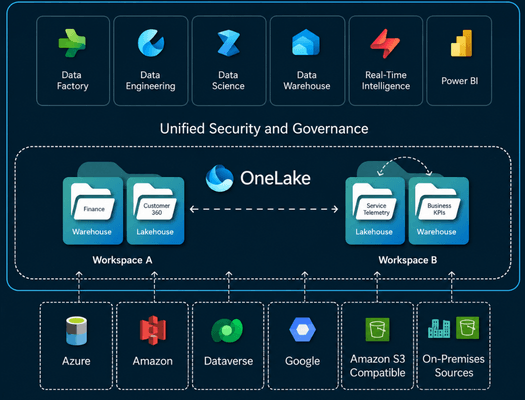
Step 2: Land It All in OneLake
How Does OneLake Unify Retail Data?
As data arrives, it lands in OneLake, Microsoft Fabric’s unified storage layer that provides a single source of truth across the organization. Built on an open Lakehouse architecture, OneLake enables data engineering, analytics, and business intelligence teams to work on the same trusted data without creating disconnected silos or duplicate copies.
This unified foundation improves collaboration, governance, scalability, and consistency across enterprise data and analytics workflows. In other words, OneLake is what stops two teams from reporting two different sales totals.
Step 3: Apply the Medallion Architecture in the Lakehouse
Now comes the part that creates trust: structuring data so raw reality is preserved, cleansed data is consistent, and business-ready data is curated for consumption.
What Is the Medallion Architecture in Microsoft Fabric?
The medallion architecture is a layered design pattern that progressively refines data through three stages:
- Bronze: raw data from source systems, with minimal or no transformation.
- Silver: cleaned, standardized, and conformed data.
- Gold: curated, business-ready data optimized for analytics and reporting.
At the Gold layer, data is organized around business entities you can actually analyze, customers, orders, inventory, and support cases, rather than around the quirks of individual source systems.
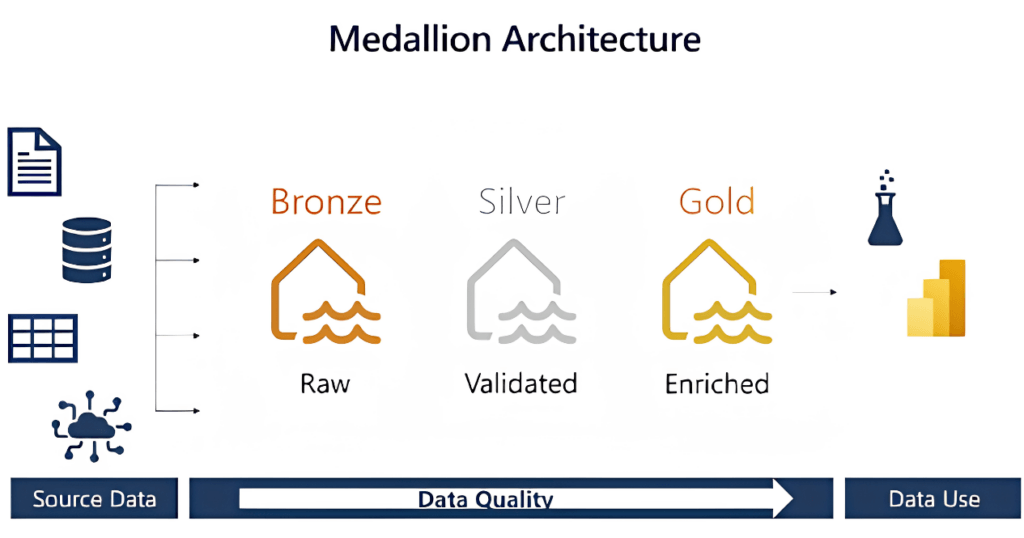
What this means: Each layer has a clear job, so you always know which version of the data to trust for a given task.
Step 4: Make It Dimensional-Model Ready in Fabric Data Warehouse
What Is Dimensional Modeling, and Why Does It Matter?
Dimensional modeling structures data around business facts and the dimensions that describe them, making it intuitive to analyze. With conformed entities in place, you can model relationships and shared metrics centrally.
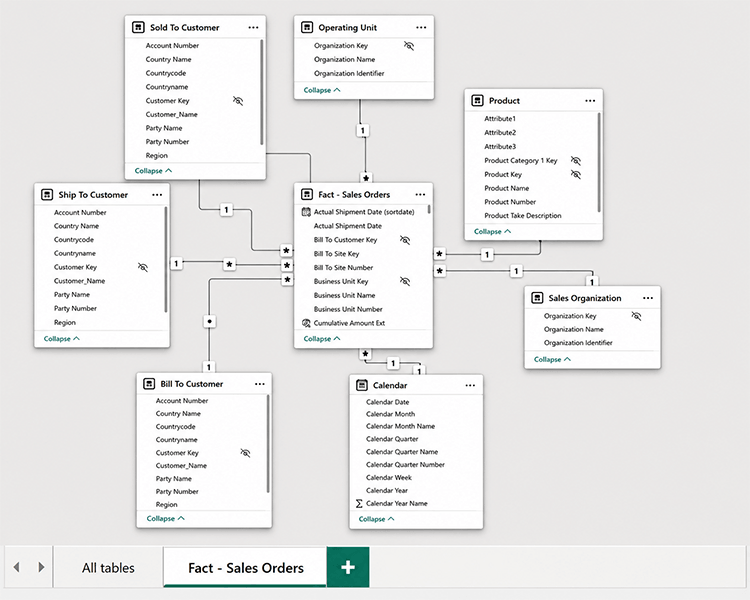
This is where you move from “datasets” to an enterprise semantic layer: consistent definitions of sales, fulfillment, inventory turns, and complaint trends, defined once and reused everywhere. Define a metric a single time, and every report inherits the same logic.
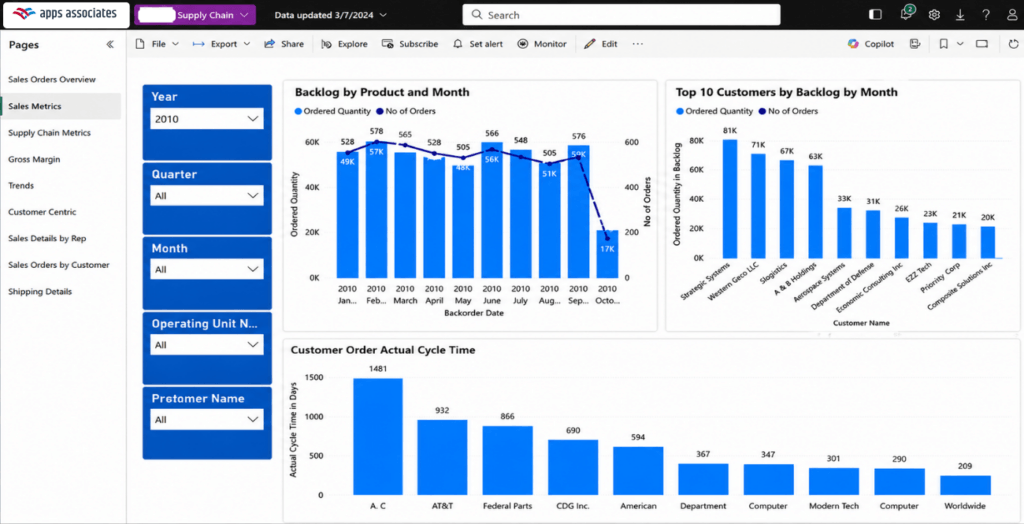
Step 5: Publish With Power BI, Without Redoing the Logic
How Does Power BI Fit Into the Microsoft Fabric Workflow?
Power BI connects directly to the curated Lakehouse and Warehouse layer. When pipelines refresh, reports refresh. And because core definitions are centralized, teams spend less time reconciling and more time acting on insights.
The result is real-time visibility built on data everyone agrees on.
What Changes After the Foundation Is in Place?
The payoff is not just faster report development. It’s a different working cadence:
- Monthly reporting becomes a repeatable pipeline, not a manual project.
- Metrics become consistent across teams because definitions live upstream.
- Data quality fixes happen once in Silver or Gold, rather than in every spreadsheet.
- Leaders spend meeting time on decisions, not disputes.
Key Takeaways
- Retailers usually struggle with data consistency, not data volume.
- Microsoft Fabric unifies ingestion, storage, transformation, modeling, and reporting in one platform.
- OneLake delivers a single source of truth, eliminating silos and duplicate copies.
- The medallion architecture (Bronze, Silver, and Gold) builds trust layer by layer.
- Dimensional modeling in the Fabric Data Warehouse defines metrics once for reuse everywhere.
- Power BI consumes curated data so reports stay consistent and current.
Build Your Trusted Retail Analytics Foundation With Apps Associates
Designing a governed Lakehouse, applying the medallion architecture, and modeling enterprise metrics takes proven expertise. As an enterprise applications and technology advisor, Apps Associates helps retailers implement Microsoft Fabric end to end, from ingestion and OneLake design through dimensional modeling and Power BI reporting. The goal is the same one this post describes: a single source of truth your whole organization can trust.
Ready to turn disconnected retail data into a foundation for confident decisions? Connect with Apps Associates to plan your Microsoft Fabric journey.
This post intentionally uses a generic retail example and does not include customer-identifying details, system names, tenant or workspace identifiers, or internal URLs.
References
- https://learn.microsoft.com/en-us/fabric/onelake/create-lakehouse-onelake?source=recommendations
- https://learn.microsoft.com/en-us/azure/databricks/lakehouse/medallion
- https://learn.microsoft.com/en-us/fabric/data-engineering/notebooks
Work with Apps Associates
Apps Associates is a service-led business built upon advisory, implementation, managed services, and AI services, delivered across Oracle Cloud Infrastructure (OCI) and Oracle Cloud Applications (ERP, HCM, SCM, EPM). As a true OracleAdvantage partner, we unify Oracle SaaS, OCI, data, and AI into one transformation journey, offering full-stack execution unlike any other partner of our size.
Contact Apps Associates today to learn how we can work with you.