Modernizing Logistics: How OIC Connects Oracle Fusion Cloud with 3PL Systems
Acronyms and Abbreviations
| ACRONYM | FULL FORM | ACRONYM | FULL FORM |
| 3PL | Third-Party Logistics | OCI | Oracle Cloud Infrastructure |
| API | Application Programming Interface | REST | Representational State Transfer |
| ASN | Advance Ship Notice | SOAP | Simple Object Access Protocol |
| BIP | Business Intelligence Publisher | SO | Sales Order |
| DFF | Descriptive Flexfield | TO | Transfer Order |
| ERP | Enterprise Resource Planning | UTC | Coordinated Universal Time |
| OIC | Oracle Integration Cloud | WMS | Warehouse Management System |
Overview
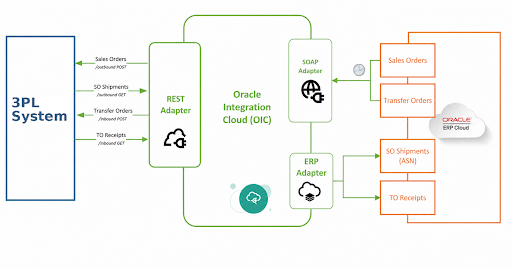
When you connect Oracle ERP to a third-party logistics (3PL) provider, the physical side is straightforward pallets in, parcels out. The complexity lives in the data layer: keeping Oracle and the 3PL Warehouse Management System (WMS) in sync across every inbound shipment and outbound order. This guide covers two complete integration loops built on Oracle Integration Cloud (OIC), the inbound Transfer Order loop including Shipment Receipt, and the outbound Sales Order loop including Shipment ASN confirmation.

“The warehouse is the easy part. The hard part is making your ERP and the 3PL WMS speak the same language reliably, at scale, without human intervention.”
01 – INBOUND LOOP
Transfer Orders & Shipment Receipt
The inbound loop covers two integrated flows: dispatching Transfer Orders from Oracle to the 3PL, and processing the Shipment Receipt confirmation back into Oracle once the goods arrive. Together, they ensure inventory moved to the Fulfillment Center is accurately reflected in Oracle closing the TO line and making stock available for outbound fulfillment.
Flow 1 – Oracle to 3PL: Transfer Order Dispatch
A Transfer Order (TO) moves goods from your manufacturing organization to the 3PL Fulfillment Center, which Oracle treats as an external inventory organization. The integration identifies eligible TOs and transmits them to the 3PL:
- Ship-to warehouse is the designated 3PL Fulfillment Center
- Order line status must be Shipped
- Already-transmitted lines are excluded to prevent duplicate processing
A scheduled OIC flow invokes a BIP report via a SOAP API, extracts eligible Transfer Orders, and transmits them to the 3PL REST API in batches of 200 lines per request. The 3PL processes orders asynchronously, and a secondary OIC flow runs every hour to query the 3PL Jobs API and resolve pending statuses, writing results back to the Oracle Shipment Line DFF.
OIC Schedule Parameters – Transfer Order Dispatch
FromDate: Defaults to LastRunDate. Configurable for manual reruns or backfill.
ToDate: Defaults to current date/time. | DFFStatus: Set to ‘Error’ to reprocess failed records.
All date parameters in UTC. LastRunDate updated after each successful run. Email alerts on exceptions.
| API Response | DFF Status | Meaning |
| Sent for processing | Order_Processing | Accepted, Jobs polling flow resolves hourly |
| Completed | Order_Sync_Success | Transfer Order successfully received in 3PL |
| Any other response | Order_Sync_Error | Submission failed, requires investigation |
Flow 2 – 3PL to Oracle: Shipment Receipt
Once the 3PL receives and processes the inbound shipment, the Shipment Receipt integration closes the loop back into Oracle. This is a separate scheduled OIC flow that queries the 3PL /inbound GET API for orders with Completed status and posts the corresponding receipts in Oracle Cloud.
Before performing the receipt, OIC invokes the Oracle GET Transfer Order REST API to validate line statuses receipt is only posted when all associated TO lines are in Open status, preventing double receipts. Once confirmed, Oracle updates the on-hand balance at the 3PL org, makes inventory available for Sales Order fulfillment, and closes the Transfer Order.
OIC Query Parameters- Shipment Receipt
FromDate (CompletedAfter): Defaults to LastRunDate. Configurable via schedule_parameter. UTC.
ToDate (CompletedBefore): Defaults to current date/time. UTC.
All date parameters in UTC. Email alerts dispatched on any exceptions.
| API Response | DFF Status | Meaning |
| Success | Ship_Receipt_Success | Receipt posted, inventory live in Oracle |
| Any error response | Ship_Receipt_Error | Receipt failed, requires review |
Watch for receipt discrepancies
If the 3PL receives fewer units than shipped, your Oracle TO will show a variance.
Decide upfront how to handle short receipts, re-confirmation or Oracle adjustment. Define this in your SOP before go-live
02 – OUTBOUND LOOP
Sales Orders & Shipment ASN
The outbound loop covers two integrated flows: dispatching Sales Orders from Oracle to the 3PL for fulfillment, and processing the Shipment ASN confirmation back into Oracle once the order ships. Together, they close the outbound fulfillment cycle triggering invoicing, populating tracking numbers, recording shipping costs, and reflecting the true shipped state in Oracle.
Flow 1 – Oracle to 3PL: Sales Order Dispatch
Once inventory is at the 3PL Fulfillment Center, customer Sales Orders route there for fulfillment. Oracle Order Management handles ATP checking and pick release, while OIC drives the dispatch to the 3PL WMS. The integration applies two eligibility conditions:
- Ship-from warehouse is the designated 3PL Fulfillment Center
- Shipment line status is Released to Warehouse
At pick release, a scheduled OIC flow invokes a BIP report via SOAP and transmits the order to the 3PL REST API in batches of 200 lines, carrying everything needed: items, quantities, ship-to details, and carrier instructions. Already-interfaced lines are automatically excluded. The same two-flow asynchronous pattern used for Transfer Orders applies here — a Jobs polling flow runs every hour to resolve pending statuses and update the Oracle Shipment Line DFF.
OIC Schedule Parameters – Sales Order Dispatch
FromDate: Defaults to LastRunDate. Configurable for manual reprocessing.
ToDate: Defaults to current date. | DFFStatus: Set to ‘Error’ for targeted reprocessing.
All date parameters in UTC. LastRunDate updated after each successful run. Email alerts on exceptions.
| API Response | DFF Status | Meaning |
| Sent for processing | Order_Processing | Accepted, Jobs polling flow resolves hourly |
| Completed | Order_Sync_Success | Sales order successfully received in 3PL |
| Any other response | Order_Sync_Error | Submission failed, requires investigation |
Flow 2 – 3PL to Oracle: Shipment ASN
After the 3PL picks, packs, and ships a customer order, the Shipment ASN integration closes the loop back into Oracle. A scheduled OIC flow queries the 3PL /outbound GET API for orders with Completed status and executes the following in Oracle for each:
- Pick confirm performed using the Pick Slip number retrieved via a BI report
- Waybill Number updated at the shipment header level using the 3PL tracking number
- Tracking numbers populated on all associated Shipment Lines
- Shipping costs recorded with duplicate-cost validation to prevent double-posting
- Ship confirm performed, Oracle closes the order and triggers the invoice workflow
The sub-process is atomic, if any step fails, the error is returned to the main flow without partial commits, preserving Oracle data integrity. Email alerts fire on exceptions and LastRunDate is updated after each successful run.
OIC Query Parameters – Shipment ASNFromDate (CompletedAfter): Defaults to LastRunDate. Configurable via schedule_parameter. UTC.
ToDate (CompletedBefore): Defaults to current date/time. UTC.
Status = Completed: filters fulfilled shipments only.
| API Response | DFF Status | Meaning |
| Success | Ship_Confirm_Success | Pick and ship confirmed, invoice triggered |
| Shipment Already processed | Ship_Confirm_Success | Idempotent, safely skipped |
| Any other response | Ship_Confirm_Error | Processing failed, requires review |
03 – SETUP & GO-LIVE READINESS
A successful integration is only as strong as the foundation it runs on. Oracle configuration and 3PL alignment done right upfront is what keeps go-live on track. The steps below lay out what needs to be completed before any OIC flow is switched on.
Key Setup Steps & Pre-Launch Checklist
Before any integration flows can run, Oracle must recognize the 3PL Fulfillment Center as a valid inventory location. Complete these steps before go-live:
- Define 3PL as an Inventory Organization
Create a new external/third-party warehouse org in Oracle Inventory with its own on-hand balances, item master, and transaction history.
- Set Up Shipping Network & ATP Rules
Define shipping lanes between manufacturing orgs and the Fulfillment Center. Configure ATP rules to check the 3PL org when evaluating Sales Order availability.
- Configure OIC Integration Flows
Set up all four scheduled OIC flows, TO Dispatch, Shipment Receipt, SO Dispatch, and Shipment ASN. Configure schedule parameters (FromDate, ToDate, DFFStatus) for each and test individually before go-live.
- Share Item Master with the 3PL
Item numbers, descriptions, UOM, weights, and dimensions must be loaded in the 3PL WMS before go-live. Mismatched item masters are the #1 cause of integration failures.
Pre-Launch Checklist
- 3PL Fulfillment Center confirmed as Inventory Org with correct parameters
- Shipping networks and ATP rules configured and validated
- Item master shared with 3PL, confirmed match in their WMS
- Transfer Order dispatch and Shipment Receipt flows tested end-to-end
- Sales Order dispatch and Shipment ASN flows tested end-to-end
- Partial shipment configured and tested at customer and order level
- OIC flow monitoring and email alerting configured for all four integrations
- LastRunDate validated for each scheduled OIC flow
- Pilot run: process at least few real TOs and SOs before full cutover
CLOSING THOUGHTS
Oracle and 3PL integrations are complex by nature but with the right middleware, a well-designed OIC flow, and a solid go-live approach, they become a competitive advantage. The four integrations covered in this guide form a complete, automated supply chain loop that eliminates manual intervention, keeps data accurate, and lets your operations team focus on what matters most getting orders out the door.