Synchronous and A-Synchronous Integration – Integration Patterns and Methodology part 2
This blog is a continuation of our earlier article on integration patterns and methodologies. In Part 1, we explored three different integration patterns — each helping systems exchange data in their own way. In this Part 2, we continue from there and explore three additional patterns. If you read the first part, you’re already familiar with the earlier patterns — if not, don’t worry. This post will help you understand these additional patterns. you can pick the right pattern for the right scenario and build systems that stay clean, reliable and easy to manage over time.

API – Led Connectivity:
API-led connectivity is an architectural approach that structures system integration through a series of reusable APIs, each serving a distinct role within an organization’s ecosystem.
The Three Layers of API-led Connectivity:
- System APIs: These APIs provide direct access to core systems of record, such as databases or ERP systems, abstracting the complexity of these systems and exposing data in a standardized manner.
- Process APIs: They orchestrate and process data from multiple System APIs, applying business logic to meet specific organizational needs.
- Experience APIs: Tailored for specific user interfaces or channels (e.g., mobile apps, web portals), these APIs deliver data in formats optimized for the end-user experience.
Example:
Consider a scenario where a company wants to synchronize product information between Epicor ERP (source) and Salesforce (target) using MuleSoft as the middleware platform. The integration follows the API-led connectivity pattern, leveraging three distinct API layers — System API, Process API, and Experience API — to enable data flow and transformation in a controlled and scalable manner.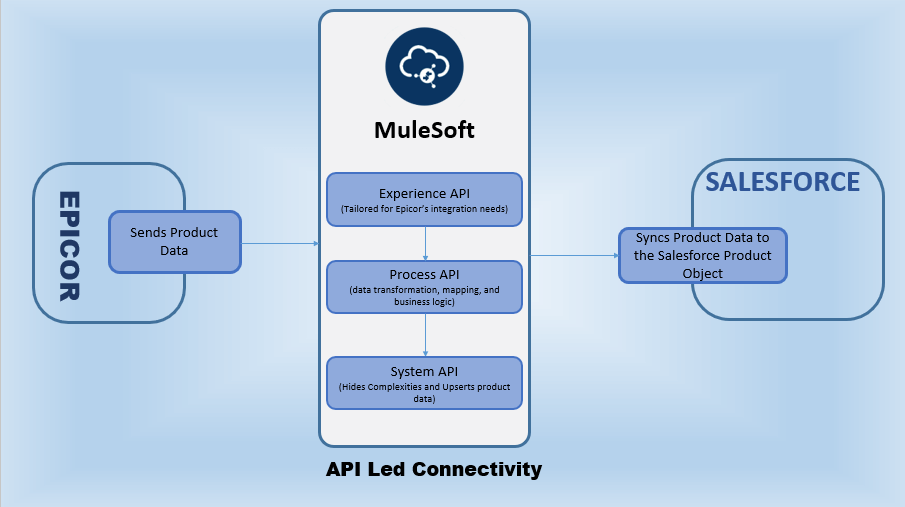
- Experience API (Epicor EAPI):
- MuleSoft exposes an Experience API endpoint that receives product data from Epicor.
- This API is tailored specifically for Epicor’s interaction needs, ensuring that the source system can easily push product information into MuleSoft without worrying about downstream logic or transformations.
- Process API (PAPI):
- Once the product data is received, the Process API layer in MuleSoft performs data transformation, mapping, and business logic.
- It ensures that the product information from Epicor is converted into a structure compatible with Salesforce’s data model — such as aligning field names, formatting, and validation rules.
- System API (Salesforce SAPI):
- The System API abstracts and manages connectivity with Salesforce.
- It securely upserts the transformed product data into Salesforce’s product Object, ensuring that records are updated or created as needed.
- This layer hides Salesforce-specific complexities (like authentication, object structures, or API limits) from upstream systems.
API-led connectivity transforms traditional point-to-point integration into a modular, layered, and scalable architecture. In this example, MuleSoft acts as the middleware backbone — connecting Epicor ERP and Salesforce through well-defined Experience, Process, and System APIs.
This structured approach ensures reliable and reusable integration — ultimately improving business agility and enabling seamless synchronization of product data across enterprise systems.
Synchronous Integration Pattern:
In this pattern, the requesting process/system waits for the response from the called system/process before moving forward. This approach is suitable for scenarios where real-time data validation, immediate feedback, or transactional integrity is essential. Synchronous integrations are ideal when an immediate response is required before proceeding to the next step in a process.
In Oracle Integration Cloud (OIC), synchronous integrations are best suited for short-running processes that can complete within a few seconds. Long-running or time-consuming integrations should be designed as asynchronous flows to avoid timeouts and ensure reliability.
In this Setup:
- E-commerce Application is the Source System:
- An e-commerce application is a digital platform that enables customers to browse products, place orders, make secure payments, and track deliveries online.
- OIC is the middleware:
- A cloud-based platform that connects applications and automates business processes across systems.
- Oracle ERP is the Target System:
- A suite of cloud-based enterprise resource planning applications that manage business functions like finance, procurement, and supply chain.
Example:
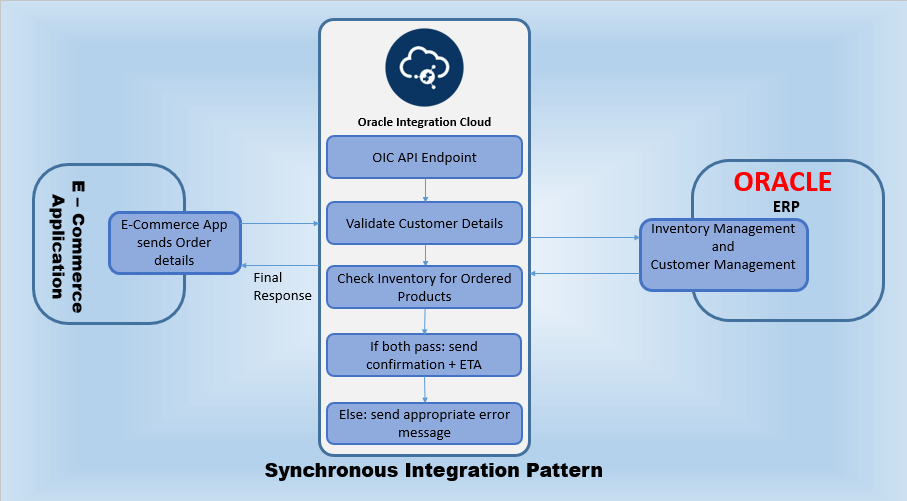
Consider a scenario where a customer places an order through an e-commerce application. Before confirming the order, the system needs to validate the customer’s details and check product availability. The customer expects immediate feedback on whether the order can be processed.
- Trigger
- The e-commerce application sends a request to the OIC integration with order details.
- Customer Validation:
- OIC invokes the Oracle ERP system to validate customer information.
- Product Availability Check:
- OIC calls the Oracle ERP system to verify if the ordered products are in stock.
- Order Confirmation:
- If validation and availability checks pass:
- OIC responds to the e-commerce application with an order confirmation and estimated delivery date.
- If any check fails:
- OIC responds with an appropriate error message indicating the issue (e.g., invalid customer details or out-of-stock items).
- If validation and availability checks pass:
In this scenario the customer receives immediate feedback on the order status, allowing them to proceed accordingly.
Asynchronous / Fire-and-Forget:
Asynchronous Messaging / Fire-and-Forget is an integration pattern where one system sends a message or data to another system/process without waiting for a reply. Think of it like dropping a letter into a mailbox—you send it and move on, trusting the system will handle it. This is useful when you don’t need an immediate response and don’t want your system to be delayed while waiting.
In this Setup:
- Oracle ERP is the Source system:
- A suite of cloud-based enterprise resource planning applications that manage business functions like finance, procurement, and supply chain.
- OIC (Oracle Integration Cloud) is the Middleware:
- A cloud-based platform that connects applications and automates business processes across systems.
- Database is the Target System:
- A database is an organized collection of data stored and managed electronically for easy access, retrieval, and updating.
Example:
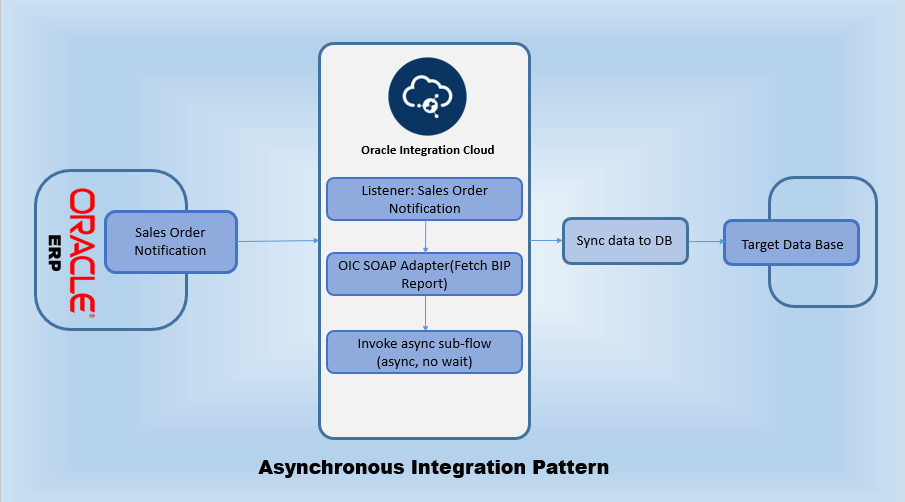
Consider a scenario where a company wants to sync the sales order information to a database in an asynchronous format.
- Event Trigger in Oracle ERP Cloud
- A SalesOrderNotification event is triggered in Oracle ERP Cloud when a sales order is created or updated.
- This event is configured within Oracle ERP Cloud’s Order Management module by activating the appropriate business event trigger points.
- OIC Receives the Event
- Upon receiving the SalesOrderNotification event, OIC initiates the corresponding integration process.
- Retrieve Sales Order Data
- OIC uses the SOAP Adapter to connect to a BIP (Business Intelligence Publisher) report in Oracle ERP Cloud.
- It retrieves the relevant sales order details associated with the triggered event in the main integration flow.
- Invoke Async sub flow
- After receiving the sales order data from oracle ERP cloud using a BIP report, the main flow asynchronously invokes the sub flow in OIC.
- The sub flow does the remaining part of integration i.e., Applying transformations, Syncing the sales order data to data base and handling exceptions if any in the sub flow.
- But the main flow does not wait for the response from sub flow.
Why is it important to follow a proper integration pattern?
Following a proper integration pattern is crucial in software development because it ensures that different systems or applications can work together smoothly and efficiently. Integration patterns are standardized methods or templates that guide how systems should connect and communicate. By adhering to these patterns, developers can:
- Enhance Reliability: Standardized integration reduces the chances of errors and system failures.
- Reduce Costs: Efficient integration minimizes the time and resources needed for development and troubleshooting.
- Ensure Scalability: Proper patterns allow systems to grow and adapt without significant rework.
In summary, following a proper integration pattern leads to more robust, adaptable, and cost-effective software systems.