Oracle Cloud HCM: Creating a Dynamic Pivot Template for the Payroll Activity Report
Overview
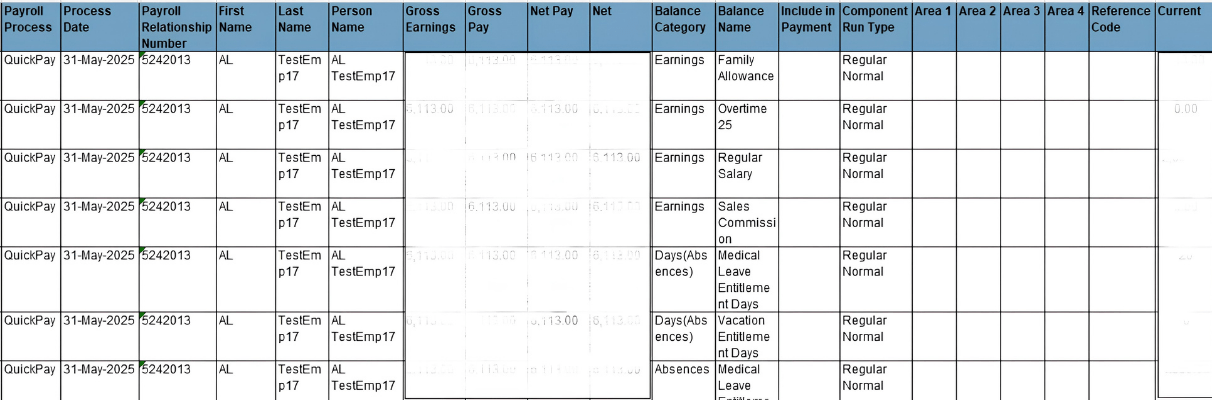
In Oracle Cloud HCM, the standard Payroll Activity Report is widely used for reviewing payroll balances and element results for employees within a payroll run. While it provides comprehensive data, its default structure presents a significant usability challenge: it generates multiple rows per employee, with one row for each balance.

This row-based structure becomes difficult to analyze, especially when dealing with large employee populations or multiple balance types. Users often export the data into Excel and manually create pivot tables to consolidate the information into a more readable format. This process is time-consuming, error-prone, and inefficient.
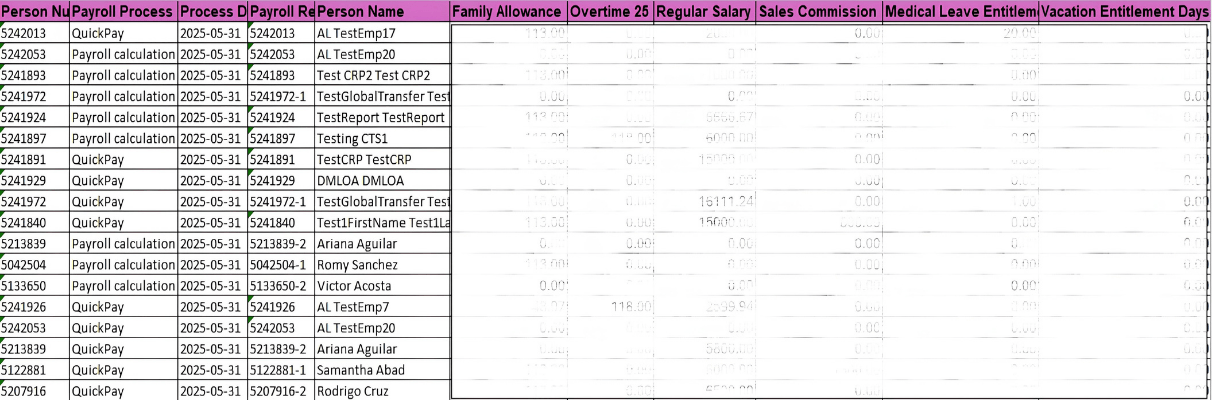
To address this limitation, we developed a custom BI Publisher template that dynamically pivots the dataset at runtime. This solution transforms the report into a columnar format where each employee appears in a single row, each unique balance is displayed as a separate column, balance values are dynamically mapped to the correct columns, and the structure automatically adapts to new balances in future payroll runs. The solution leverages the standard HCM Extract XML generated by the Payroll Activity Report, ensuring compatibility and scalability without altering the underlying data source.
Payroll Activity Report — Detailed Overview
The Payroll Activity Report in Oracle Fusion HCM provides a detailed breakdown of all payroll elements and balances processed during a payroll run. It is commonly used for:
- Payroll validation and reconciliation
- Auditing payroll results
- Reviewing earnings, deductions, employer contributions, and hours
- Supporting financial reporting and compliance
The report pulls data from payroll run results and organizes it into sections such as:
- Employee details
- Payroll relationship actions
- Balance categories (Earnings, Deductions, Payments, etc.)
However, the report’s default design outputs one row per balance per employee. For example, if an employee has 10 balances, the report produces 10 rows for that employee. When scaled across hundreds or thousands of employees, this results in a large and fragmented dataset that is difficult to interpret directly.
Why a Custom Template Is Needed
While the standard report is functionally complete, it falls short in terms of usability and business efficiency. The need for a custom template arises from several practical challenges:
- Inefficient Data Structure
The multi-row format forces users to scan through repeated employee information, making it harder to get a consolidated view of payroll data.
- Manual Effort in Excel
Most business users export the report to Excel and manually create pivot tables. This introduces:
- Additional processing time
- Risk of human error
- Inconsistent reporting formats
- Difficulty in Reconciliation
Reconciling balances across employees becomes cumbersome when data is spread across multiple rows instead of a single consolidated view.
- Scalability Issues
As organizations grow and new balances are introduced, the complexity of managing and analyzing the report increases significantly.
- Lack of Readability
Business stakeholders prefer a tabular format where each row represents an employee and each column represents a balance. The standard report does not provide this format.
The custom template directly addresses these challenges by transforming the report into a pivot-style layout that is intuitive, scalable, and analysis-friendly.
Prerequisites
Before implementing this solution, ensure the following prerequisites are in place:
- Access to Oracle Cloud HCM with appropriate roles
- BI Publisher (BIP) access for template development
- Knowledge of RTF template design and XML structure
- Access to the Payroll Activity Report extract XML
- Basic understanding of XSLT and grouping logic
- Permissions to upload and register custom templates in Oracle Cloud
Our Solution
The custom template introduces a dynamic pivot mechanism within the BI Publisher RTF template. The logic is implemented using grouping and aggregation functions to restructure the data.
Key Features of the Solution
- Employees are displayed as rows
- Balances are dynamically generated as columns
- Values are calculated and mapped correctly per employee
- The structure adapts automatically to new balances
Report Output (Before):
Report Output (After):
Pivoted payroll report showing one row per employee with dynamically generated balance columns, where each column represents a unique balance, and values are aligned per employee.
Challenges and Limitations
While the solution is highly effective, there are a few considerations to keep in mind:
- Performance with Large Datasets: For very large payroll populations with hundreds of balances, the template may experience performance delays due to dynamic column generation.
- Column Width Constraints: BI Publisher templates have limitations on column widths. A large number of balances may result in formatting challenges or require landscape orientation.
- Template Complexity: The RTF template logic can become complex, especially when handling multiple balance categories and conditions.
- Testing Effort: Extensive testing is required to ensure accuracy across different payroll runs and configurations.
Conclusion
The custom pivot template significantly enhances the usability of the Payroll Activity Report in Oracle Cloud HCM by transforming a complex, multi-row dataset into a clean, single-row-per-employee format. This eliminates the need for manual Excel pivots, saving considerable time and reducing the risk of errors during payroll reconciliation.
From a business perspective, this solution improves efficiency, enables faster decision-making, and provides a more intuitive reporting experience for end users. The dynamic nature of the template ensures that it automatically adapts to new balances, making it future-proof and reusable across different payroll configurations.
Moreover, this approach is not limited to the Payroll Activity Report. The same concept can be extended to other standard Oracle reports that require pivot-style transformations, making it a valuable pattern for broader reporting needs.
Overall, this solution demonstrates how BI Publisher customization can bridge the gap between technical data structures and business-friendly reporting formats.