Power BI Security and Row-Level Access in Enterprise Organizations
Who This Article Is For
Power BI adoption is growing in organizations across many industries. But with this expansion comes the need for a greater emphasis on security. A missing security layer can expose financial results, customer records, or employee data to the wrong people in seconds.

As Power BI adoption grows across an organization, this scenario becomes surprisingly common. Reports get shared widely, teams reorganize, and permissions quietly fall out of sync. What starts as a convenience turns into a compliance risk.
This article is for anyone working with Power BI in a large organization—whether you’re building or managing reports.
You’ll find this especially helpful if you’re one of the following:
- Power BI developers and report authors who want to understand how security works in enterprise deployments
- Data engineers and BI architects designing scalable analytics platforms
- IT administrators responsible for Power BI workspace governance and access control
- Business analysts and managers
In most projects, security starts as an afterthought—but at scale, it has to be part of the design from day one.
Here’s what we’ll cover:
- Why data security becomes challenging as Power BI adoption grows
- How organizations ensure users only see the data relevant to them
- How Row-Level Security (RLS) works conceptually
- A practical architecture approach often used in enterprise environments
Challenges Commonly Seen in Enterprise Deployments
Most organizations using Power BI want broad access to data while keeping sensitive information restricted to the right audience.
Data Overexposure
Reports are often shared across teams. Without row-level filtering, users may see data from other departments, regions, or customers. In one environment I worked with, a district manager was able to see sales performance across multiple districts simply because the report lacked proper filtering logic. The report itself was correct—the security layer was missing.
Complex Organizational Structures
Most large organizations have layers like regions, countries, business units, and departments. Mapping this structure into Power BI security rules can become difficult if the data model and security tables are not designed carefully.
Manual Permission Management
In some environments, permissions are still assigned directly to individual users. That might work for a few users, but breaks down quickly. Employees change roles, teams reorganize, and new hires join regularly. Managing permissions manually becomes both time-consuming and error-prone.
Multiple Data Sources
Enterprise reporting data often comes from a combination of ERP platforms, CRM systems, operational databases, and cloud applications. Keeping security consistent across all these sources means your data platform and reporting layer need to work closely together.
Performance Considerations
Row-Level Security adds extra filtering to every query. If the implementation relies on complex DAX expressions or inefficient relationships, report performance can suffer, especially with large datasets.
Governance and Compliance
Many organizations operate in regulated industries where access to financial, operational, or customer data must be controlled and auditable.
The Goal of Enterprise Power BI Security
Power BI security lets users share a report while only seeing their data. Instead of building separate reports for every department or region, you can use one report and make it work for everyone.
Most teams are trying to do a few key things:
- Protect sensitive data such as financial metrics, employee information, or internal performance indicators
- Ensure users only see data relevant to their role, department, or region
- Centralize security logic so it remains consistent across reports
- Scale access management without manually updating thousands of user permissions
- Meet governance and compliance requirements
- Keep the reporting experience simple for end users
A Simple Way to Think About Power BI Security
When someone opens a report, like entering a building:
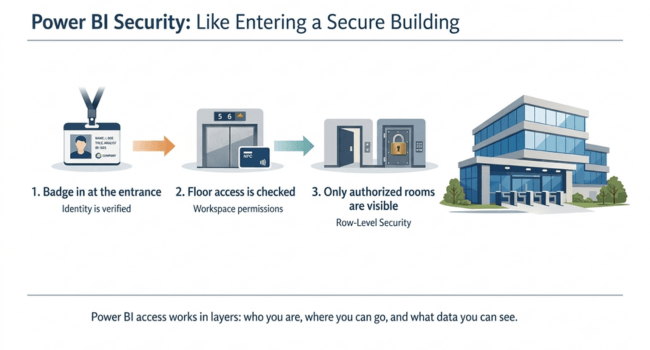
- You first badge in at the entrance (your identity is verified)
- Then security checks which floors you’re allowed to access (workspace permissions)
- Once you’re inside, you only see the rooms you’re authorized to enter (Row-Level Security)

Identity and Authentication
Power BI security starts with Microsoft Entra ID (previously Azure Active Directory). When users sign in, Power BI uses their identity to decide what they can access. Instead of giving access to each person one by one, most organizations handle this through security groups.
When someone joins or leaves, you update the group—no need to touch reports.
Workspace and Content Security
In Power BI, everything is organized into workspaces. A workspace usually contains datasets, reports, and dashboards.
Who can access a workspace is controlled through a set of predefined roles:
- Admin – full control over the workspace
- Member – can modify and manage content
- Contributor – can publish new content
- Viewer – can only view reports
Workspaces are separated based on where things are in the development lifecycle. A common setup looks like this:
- Development
- Testing
- Production
Reports and datasets are built and tested in lower environments before moving to production
Dataset-Level Security
In well-structured models, security is handled at the dataset level rather than in reports. Any report built on top automatically follows the same security rules. Power BI gives you a few ways to control access at this level:
- Row-Level Security (RLS)
- Object-Level Security (OLS)
- Workspace permissions
Understanding Row-Level Security (RLS)
Row-Level Security (RLS) is one of the key features that makes Power BI viable at enterprise scale. RLS filters data based on who is viewing the report.
For example:
- A regional manager may see sales results only for their region
- A store manager may see performance data only for their store
- An HR analyst may see employee records only within their business unit
While RLS can be implemented using static roles, most enterprise environments use Dynamic RLS. Instead of maintaining separate roles for each user or region, access is managed through a Security Mapping Table that links users to the data they are authorized to see.
Using Security Mapping Tables
RLS is handled using a security mapping table. This table typically maps:
- Users
- Regions
- Departments
- Business units
When someone opens a report, Power BI checks who they are and looks them up in that table. The dataset then filters the data automatically.
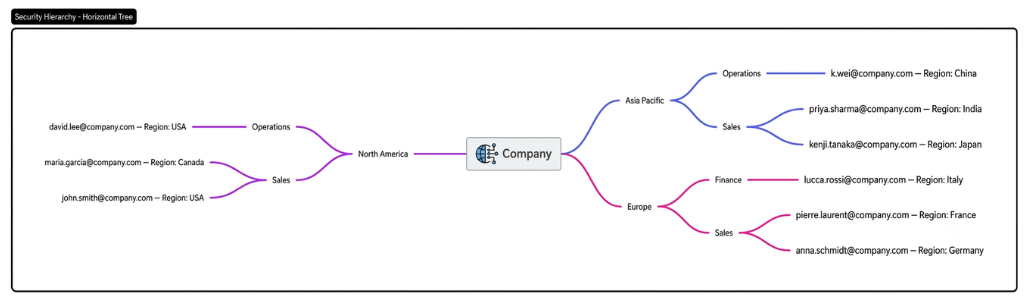
Security Mapping Table Example
| UserEmail | Region | BusinessUnit | Role |
| [email protected] | East | Retail | Manager |
| [email protected] | West | Retail | Manager |
| [email protected] | All | Retail | Director |
SecurityMapping[UserEmail] = USERPRINCIPALNAME()
How It Works
- A user signs in to Power BI.
- USERPRINCIPALNAME() identifies the current user.
- Power BI matches that user against the Security Mapping table.
- The user’s assigned Region, Business Unit, or other attributes are applied as filters through model relationships.
- The report automatically displays only authorized data.
With this approach, security is managed centrally, making it easier to scale access control across large organizations while avoiding the maintenance overhead of multiple static roles.
Object-Level Security (OLS)
Row-Level Security controls which rows a user can see. Object-Level Security takes this a step further by hiding entire tables or columns. OLS is useful when certain fields shouldn’t be visible to everyone.
For example:
- Hiding salary or personally identifiable information from non-HR users
- Preventing sales teams from seeing cost or margin columns
- Restricting access to confidential product data
This is usually set up in the semantic model using tools like Tabular Editor.
Data Source Security
Power BI shouldn’t be your only line of defense for protecting data. Your data platform should also have its own security controls.
Some common approaches include:
- Database role-based security
- Data warehouse access policies
- Secure views or stored procedures
This ensures the same controls apply even outside Power BI.
Governance and Monitoring
It’s important to understand how data is used. Power BI includes tools to track usage and access patterns.
- The Power BI Admin Portal
- Usage analytics reports
- Audit logs
- Sensitivity labels and data classification
Performance Considerations
Since Row-Level Security adds extra filtering to queries, it’s important to design your model carefully.
- Avoid overly complex DAX filters
- Use clean relationship models
- Keep security mapping tables reasonably sized
- Pre-aggregate large datasets when possible
Common Implementation Mistakes
A common mistake is creating separate copies of reports for different teams. Instead of using Row-Level Security, teams end up duplicating reports for each department or region. This quickly becomes hard to manage because every change must be applied to multiple versions.
Another mistake is handling security inside individual reports instead of at the dataset level.
When each report contains its own security logic, inconsistencies are almost inevitable.
Sometimes, teams also give permissions directly to individual users. As the environment grows, this becomes extremely difficult to manage. Security groups in Microsoft Entra ID provide a much more scalable approach.
And finally, overly complex RLS setups can slow things down. A simple dynamic RLS model backed by a clean mapping table is usually easier to maintain and performs better.
✅ Use Microsoft Entra ID groups instead of managing individual users.
✅ Implement security at the dataset level.
✅ Use Dynamic Row-Level Security for scalable access control.
✅ Store permissions in a dedicated Security Mapping Table.
✅ Use Object-Level Security for sensitive columns.
✅ Monitor access through audit logs and governance tools.
✅ Enterprise Power BI Row-Level Security Best Practices
Summary
Power BI makes it easy to share analytics with large numbers of users across an organization.
Large organizations deal with complex structures, large datasets, compliance requirements, and changing user roles. Without a solid security setup, it’s easy to run into access issues or compliance risks.
Successful setups include:
- Identity management through Microsoft Entra ID
- Controlled workspace access
- Dataset-level security rules
- Dynamic Row-Level Security for data filtering
- Object-Level Security for sensitive fields
- Integration with source-system security
- Ongoing monitoring and governance
When security is built into the dataset from the start and reports are not duplicated for different audiences, the experience feels seamless for users. They open a report and see only relevant data.
Treating security as a core part of your design helps organizations scale Power BI with confidence while maintaining trust, compliance, and data protection.
Need Help Scaling Power BI Security?
If your organization is struggling to scale Power BI security across complex business structures, our team has helped multiple enterprises implement robust, maintainable Row-Level Security, governance, and access-control frameworks. Contact us to discuss your Power BI security strategy and architecture.
References and Further Reading
Official Microsoft Documentation
- Power BI Row-Level Security (RLS)
https://learn.microsoft.com/power-bi/enterprise/service-admin-rls - Implement Row-Level Security in Power BI
https://learn.microsoft.com/power-bi/guidance/rls-guidance - Power BI Security Overview
https://learn.microsoft.com/power-bi/enterprise/service-admin-power-bi-security - Power BI Workspace Roles and Permissions
https://learn.microsoft.com/power-bi/collaborate-share/service-roles-new-workspaces - Object-Level Security in Power BI
https://learn.microsoft.com/analysis-services/tabular-models/object-level-security - Power BI Governance and Deployment Guidance
https://learn.microsoft.com/power-bi/guidance/ - Power BI Enterprise Deployment Whitepaper
https://learn.microsoft.com/power-bi/guidance/whitepaper-powerbi-enterprise-deployment - Power BI Adoption Roadmap (Microsoft guidance for enterprise governance)
https://learn.microsoft.com/power-bi/guidance/powerbi-adoption-roadmap-overview
Microsoft Power BI Blog
- Official Power BI Blog (security, governance, and feature updates)
https://powerbi.microsoft.com/blog/