Oracle Fusion Collaboration Messaging Framework (CMK): A Practical Guide to B2B Automation
In many Oracle Fusion implementations, organizations still exchange business documents like Purchase Orders, Invoices, Acknowledgements, and Credit Notes through emails or manual file transfers. While this may work for a small number of trading partners, it quickly becomes difficult to manage as business grows.

Oracle Fusion Collaboration Messaging Framework (CMK) helps solve this problem by providing a controlled and automated way to exchange business documents between Oracle Fusion Cloud and external trading partners. It helps organizations reduce manual effort, improve visibility, and build a more reliable B2B communication process.
What is CMK in Oracle Fusion?
Collaboration Messaging Framework, commonly called CMK, is an Oracle Fusion Cloud capability used for B2B document communication. It enables Oracle Fusion applications to send and receive business documents through Oracle Business Network (OBN) or other configured service providers and delivery methods.
In simple terms, CMK acts as the messaging layer between Oracle Fusion transactions and external trading partners. Fusion creates business transactions, CMK prepares the collaboration message, and the configured network or delivery channel sends it to the supplier or customer.
CMK can be used for documents such as:
- Purchase Orders
- Purchase Order Change Orders
- Purchase Order Acknowledgements
- Advance Shipment Notices (ASN)
- Supplier Invoices
- Customer Invoices and Credit Notes (Accounts Receivable)
- Shipping and Receiving Documents
- Other supported supplier collaboration documents
Why Do We Need CMK?
Without CMK, organizations often depend on manual communication. For example, a buyer may create a purchase order in Fusion, download or email the document, wait for confirmation, and then manually track whether the supplier has accepted or rejected it. This approach creates delays and makes it difficult to audit the full communication lifecycle. CMK replaces manual communication with an automated process, allowing business documents to be exchanged securely and tracked from start to finish.
Business Benefits of CMK
- Automated Supplier Collaboration: Business documents can be sent and received without manual email handling.
- Faster Transaction Processing: Purchase orders, acknowledgements, invoices, and shipment notices can move through the process quickly.
- Better Tracking and Visibility: Message status can be monitored from the Collaboration Messaging work area.
- Reduced Manual Errors: Standard message definitions and routing rules reduce rework caused by incorrect communication.
- Scalable Partner Onboarding: The same framework can support multiple suppliers, customers, and document types.
- Improved Auditability: Business users and support teams can review message history, errors, retries, and delivery status.
- Standardized B2B Process: Organizations can align document exchange with supported standards such as OAGIS, cXML, UBL, or other configured formats.
Core Components of Oracle Fusion CMK
Service Provider
Think of a Service Provider as the communication channel that delivers business documents between Oracle Fusion and external trading partners. Depending on the business requirement, it can be Oracle Business Network (OBN) or another supported delivery method. In most Oracle Fusion implementations, OBN is the preferred choice for securely exchanging documents with suppliers and customers.
Trading Partner
A Trading Partner represents the external supplier or customer with whom documents are exchanged. The configuration usually includes partner identifiers, document capabilities, delivery preferences, and routing details.
Message Definition
Message Definitions define the type of business document being exchanged and the message format used for that document. For example, a Purchase Order outbound message may use a specific supported format and document standard.
Delivery Method
The Delivery Method defines how the collaboration message is delivered. Depending on the configuration, this may involve Oracle Business Network, web services, file-based exchange, or another supported delivery mechanism.
Collaboration Message
A Collaboration Message is the actual message generated by CMK from a Fusion transaction. It contains the transformed business document that is routed to the trading partner.
Monitoring Framework
The Monitoring Framework makes it easy to monitor the complete lifecycle of a collaboration message. Users can see whether a message was successfully delivered, identify any errors, and take the necessary steps to resolve or reprocess failed transactions.
Oracle Business Network (OBN) and CMK
CMK and OBN are closely related, but they are not the same thing. CMK is the messaging framework inside Oracle Fusion Cloud. OBN is the business network that helps deliver documents between Oracle Fusion and registered trading partners.
A simple way to remember:
- CMK = Messaging Engine inside Fusion
- OBN = Delivery Network outside Fusion
| Component | Responsibility |
|---|---|
| Oracle Fusion | Creates the business transaction |
| CMK | Converts the transaction into a collaboration message |
| OBN | Securely routes the message |
| Trading Partner | Receives, processes, and responds |
| CMK | Processes inbound responses back into Fusion |
For example, when a Purchase Order is approved in Fusion, CMK generates the outbound collaboration message and routes it to OBN. OBN then delivers the document to the supplier. If the supplier sends an acknowledgement, the response comes back through OBN and CMK processes it back into Fusion.
Architecture and Flow Diagram
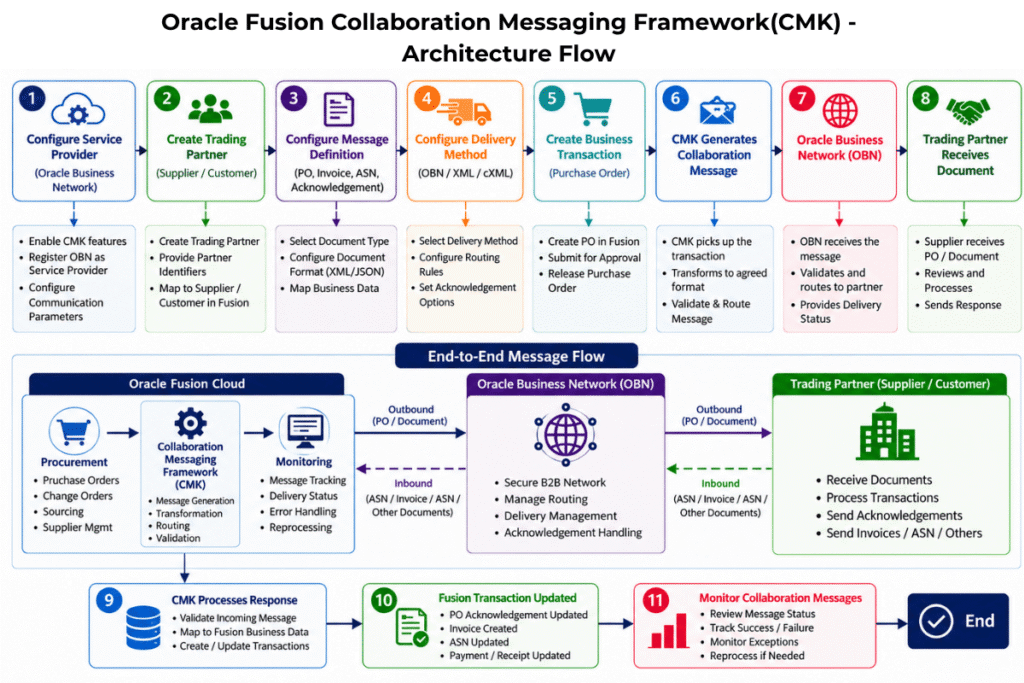
The diagram below illustrates the end-to-end Collaboration Messaging Framework (CMK) process, showing how business transactions are transformed into collaboration messages, delivered to trading partners through Oracle Business Network (OBN), and processed back into Oracle Fusion.
Quick Guide to the Flow
- Configure Service Provider: Enable CMK features and set up OBN or the required communication channel.
- Create Trading Partner: Register the supplier or customer.
- Configure Message Definition: Select the document type and define the format or mapping required for the message.
- Configure Delivery Method: Set the delivery channel and routing.
- Create Business Transaction: Create or approve the transaction in Fusion, such as a Purchase Order.
- CMK Generates Message: The framework prepares the collaboration message and transforms it into the configured format.
- OBN Delivers Message: OBN routes the message to the trading partner.
- Trading Partner Responds: Supplier receives the document and may send an acknowledgement, ASN, invoice, or other response.
- CMK Processes Response: Inbound responses are validated and Fusion transactions are updated automatically when the CMK process response is called.
- Monitor and Resolve: Business and support teams track delivery, success, failures, retries, and exceptions.
File Formats Supported in CMK
| Format | Description | Common Use Cases |
|---|---|---|
| XML | Most used structured format | PO, Invoices, ASN |
| CSV / Flat File | Flat file format | Legacy systems or simple data exchange |
| EDIFACT | International EDI standard | Global B2B and supplier integrations |
| UBL XML | Universal Business Language | Electronic invoicing (e-Invoicing) |
| cXML | Commerce XML | Procurement and supplier collaboration |
| JSON | REST/API-based integrations | API-driven integrations (typically with OIC) |
Implementation Steps
- Enable Collaboration Messaging features in Oracle Fusion.
- Configure the Service Provider, usually Oracle Business Network when OBN is used.
- Complete OBN registration and communication setup as required by the project.
- Create or configure the Trading Partner for supplier or customer communication.
- Map the trading partner to the supplier or customer record in Fusion.
- Enable the required document types for the trading partner.
- Configure Message Definitions and select the required message format.
- Configure Delivery Methods and routing rules.
- Test outbound messages using a lower environment first.
- Validate inbound acknowledgements or responses.
- Move the configuration to production with proper governance and monitoring.
Monitoring and Troubleshooting
CMK provides visibility into collaboration messages so that support teams do not have to guess whether a supplier document was generated, delivered, rejected, or stuck. The Collaboration Messaging work area is generally used to review message status and troubleshoot failures.
Common areas to check during troubleshooting:
- Message status and error details
- Whether the business transaction triggered the message
- Trading partner and supplier mapping
- Message definition and document format
- Delivery method and endpoint configuration
- OBN delivery status or acknowledgement
- Inbound response validation errors
Typical statuses may include Success, Failed, Error, Other or similar statuses depending on the message flow and configuration.
CMK vs Traditional Supplier Communication
Error HandlingDepends on email follow-up.ScalabilityHard to manage for many suppliers.
| Area | Traditional Email / Manual Process | CMK-Based Automation |
|---|---|---|
| PO Delivery | Buyers manually send PO PDF or email. | CMK automatically generates and routes the PO. |
| Acknowledgement | Supplier response is tracked manually. | Acknowledgement can be received and processed systematically. |
| Visibility | Difficult to know where the document is stuck. | Message status can be monitored end to end. |
| Error Handling | Depends on email follow-up. | Errors can be reviewed, corrected, and retried. |
| Scalability | Hard to manage for many suppliers. | Reusable framework for multiple partners and documents. |
Real-World Use Case Example
Scenario
A buyer creates and approves a Purchase Order in Oracle Fusion Procurement. The supplier is already onboarded as a trading partner through OBN.
Flow
- Fusion Procurement creates the approved PO document.
- CMK identifies the configured trading partner and document type.
- The collaboration message is generated in the required format.
- OBN routes the PO to the supplier.
- The supplier reviews the PO and sends an acknowledgement.
- The acknowledgement is received back through OBN and processed in Fusion.
Outcome
The buyer gets better visibility, the supplier receives the PO faster, and the acknowledgement is tracked in the system instead of being handled through manual email follow-ups.
Challenges and Resolutions
Challenges in Implementing CMK
- Understanding the difference between CMK, OBN, B2B, and direct integrations.
- Completing supplier onboarding and partner registration on time.
- Maintaining correct supplier and trading partner identifiers.
- Selecting the right document type, message format, and delivery method.
- Handling inbound acknowledgement or response errors.
- Troubleshooting failures when ownership is split between Fusion, OBN, and supplier systems.
Resolutions
- Start with a clear document exchange scope for each supplier.
- Use lower environments for end-to-end testing before production rollout.
- Maintain a partner onboarding checklist with identifiers and document capabilities.
- Document message definitions, delivery methods, and routing rules clearly.
- Create a support process for monitoring, retrying, and resolving failed messages.
- Align business, supplier, Oracle admin, and integration teams before go-live.
Limitations of CMK
While CMK is a powerful B2B messaging framework, there are a few limitations to consider:
- Limited to Supported Documents: CMK supports only the business documents available in Oracle Fusion. New custom document types cannot be created. Any additional document requirements must align with Oracle’s supported document catalog.
- Payload Size Limits: Large messages or attachments that exceed configured limits may fail during processing. It is recommended to keep message payloads lean and avoid embedding large attachments in the collaboration message.
- Custom Business Logic: Complex document transformations and advanced business rules usually require Oracle Integration Cloud (OIC). In these scenarios, OIC can be used alongside CMK for advanced transformation and orchestration.
Prerequisites
Before implementing CMK in Oracle Fusion, ensure:
- Oracle Fusion Cloud ERP or SCM environment with relevant modules enabled
- Procurement or Financials configuration based on the business document scope
- Oracle Business Network access where OBN is part of the design
- Required service provider and trading partner details
- Supplier or customer master data setup
- Required roles and privileges for configuration and monitoring
- Lower environment for testing and validation
- Business approval for document format and message flow
Conclusion
CMK is one of those Oracle Fusion features that deliver real value once it is implemented correctly. It removes much of the manual effort involved in B2B communications and provides a simple, reliable way to exchange business documents with trading partners.
As organizations continue to digitize their procurement and supply chain processes, CMK can play a key role in building a more connected and efficient B2B communication process.
For projects where procurement, supplier collaboration, invoicing, or shipment communication is important, CMK should be treated as a strategic part of the Oracle Fusion automation landscape rather than just a technical configuration activity.