Service-to-Sales Order Automation Using Groovy Scripts in Oracle Fusion
In modern Oracle Fusion implementations, achieving seamless integration between Service transactions and Sales Orders is critical for operational efficiency and accurate data management.

This blog demonstrates how Oracle Fusion Order Management Extensions (OME) and Groovy scripting can be used to automate the end-to-end flow between Service Requests and Sales Orders. The article focuses on:
- Synchronizing Service Request header and line attributes with Sales Orders
- Automating DFF/EFF population using Groovy scripts
- Applying rule-based defaulting during Order processing
- Implementing validation and error-handling logic in OME
- Maintaining transactional consistency across Order updates
- Extending Oracle Fusion Order Management using scalable custom logic
By leveraging Groovy-based extensions, organizations can reduce manual intervention and build a more reliable and maintainable Service-to-Sales Order integration process.
Understanding the Challenge
In Oracle Fusion, when a Sales Order is created from a Service Request, the associated part lines are automatically added to the Order as part of the standard process. However, attributes such as Descriptive Flexfields (DFFs), Extensible Flexfields (EFFs) and other related fields are not pushed to the Sales Order lines by default as part of the out-of-the-box functionality.
Traditional manual processes often lead to:
- Missing or mismatched data between Service and Sales Orders.
- Inconsistent Shipping information across multiple activities or lines.
- Manual validation overhead to enforce business rules.
- Increased errors and time-consuming exception handling.
The goal is to implement a fully automated process that propagates updates from Service Requests to Sales Orders—including both header-level and line-level attributes—while applying rule-based validations, error handling, and transactional consistency.
Process Flow Diagram
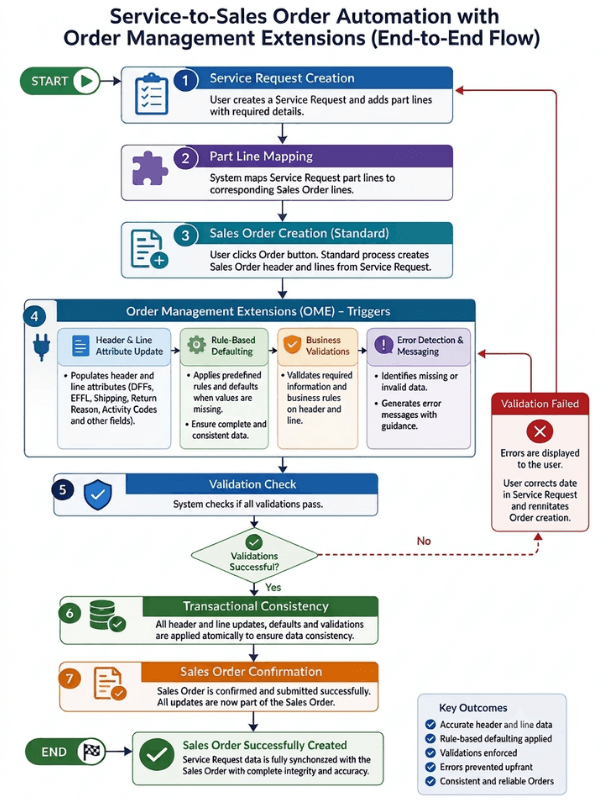
The following diagram illustrates the end-to-end automation flow from Service Request Part Lines to Sales order creation using Order Management Extensions.
Key Components of Automation Using Order Management Extensions
1. Header and Line Updates
Service-to-Sales Order integration requires updating both the Order header and individual Order lines. Key attributes such as Descriptive Flexfields (DFFs), Extensible Flexfields (EFFs), Shipping Methods, Return Reason Codes, Service Activity Codes and all other relevant fields must be accurately populated.
Using Order Management Extensions, these updates can be applied programmatically based on data from Service Request lines, ensuring consistency across all Orders and reducing manual effort. The automation also ensures that missing information can be defaulted intelligently, so orders remain complete and accurate even when some fields are not explicitly entered.
Groovy Example – Updating Sales Order Line Attributes
Using Order Management Extensions, Groovy can be used to read values available on the Sales Order line and populate or update attributes based on the Service-to-Sales Order business rules. For example:
while(lines.hasNext())
{
def line = lines.next();
// Read the Requested Ship Date
def requestedShipDate = line.getAttribute(“RequestedShipDate”)
// Apply the default value when the attribute is not populated
if (requestedShipDate == null) {
line.setAttribute(“RequestedShipDate”, defaultShipDate)
}
}
This example demonstrates how an Order Management Extension can evaluate Sales Order line data and populate the required attribute when the value is not available. Similar logic can be used to update DFFs, EFFs, shipping-related attributes, return information, and other Order fields based on the requirements.
2. Rule-Based Defaulting
Custom logic can be implemented using Order Management Extensions to assess data in the Service Request and apply values to the Sales Order based on user-defined conditions. If required information is unavailable, the extensions can apply standard default values to ensure Order creation and downstream processing proceed without manual intervention. This approach provides flexibility, ensures consistent data population, and supports the implementation of common business rules across Orders.
3. Error Handling and Messaging
Custom validations can be implemented using Order Management Extensions to enforce business rules and catch inconsistencies based on user actions. Error messages can be generated when invalid data or missing information is detected, allowing issues to be addressed before the Service Request is converted to a Sales Order. This approach helps maintain data accuracy, reduces downstream errors, and provides visibility and control over the Order creation process.
Groovy Example – Validation and Error Messaging
Order Management Extensions can also validate required information before allowing the Sales Order transaction to proceed. The following example shows how a validation error can be raised using Groovy:
import oracle.apps.scm.doo.common.extensions.Message
if (fulfillmentOrganization == null) {
throw new ValidationException(
new Message(
Message.MessageType.ERROR,
“Fulfillment Organization is required.”
)
)
}
When the validation condition is met, the extension raises an error message and prevents the transaction from proceeding with incomplete information. The user can correct the data in the Service Request and retry the Sales Order creation process.
4. Transactional Consistency
Maintaining transactional consistency is critical in Service-to-Sales Order integration. Automation ensures that header and line updates, application of defaults, and validations occur atomically, reducing the risk of partially updated Orders or inconsistent states. This guarantees that Orders are always processed in a complete, reliable, and predictable manner.
Benefits of Automation Using Order Management Extensions
Implementing Service-to-Sales Order automation using Oracle Fusion Order Management Extensions provides measurable operational and business benefits:
- Reduced Manual Processing: Eliminates repetitive user updates and minimizes dependency on manual Order maintenance.
- Improved Data Accuracy: Ensures Service Request data, DFFs, EFFs, and Shipping details remain synchronized across transactions.
- Faster Order Processing: Accelerates Sales Order creation and downstream fulfillment activities through automated defaulting and validations.
- Lower Operational Risk: Prevents incomplete or invalid Orders from progressing into fulfillment and billing processes.
- Enhanced User Experience: Provides immediate validation feedback and meaningful error messages to business users.
- Scalable Architecture: Supports high-volume transaction processing and evolving business requirements with centralized automation logic.
- Simplified Maintenance: Groovy-based extension logic can be updated independently without modifying Oracle’s standard functionality.
- Better Compliance and Governance: Ensures business rules are consistently enforced across all Orders and Service activities.
Conclusion
In modern supply chains, automating the flow of Service Request data to Sales Orders is not just a technical necessity—it’s a strategic enabler for agility, efficiency, and compliance. By leveraging custom logic using Groovy programming in Order Management Extensions (OME), organizations can automatically default values, update fields, enforce validations, and display error messages for Sales Order lines based on Service Request data.
This intelligent automation transforms manual, error-prone processes into consistent, reliable, and scalable workflows, ensuring data accuracy, reducing operational risks, and improving overall efficiency. By using Groovy’s flexibility in Order Management Extensions, businesses can enforce complex business rules, maintain transactional integrity, and provide a reliable, error-free experience for users and customers, making the automated flow of Service-to-Sales Order process a strategic advantage in Oracle Fusion.
Beyond this specific use case, Order Management Extensions demonstrate the extensibility capabilities of Oracle Fusion Cloud by enabling organizations to implement business-specific requirements within the Order Management process while preserving standard application functionality and ensuring a seamless upgrade experience. By integrating Service-driven business processes with Order Management automation, organizations can create flexible and scalable solutions that improve operational efficiency, maintain data consistency, and support evolving business needs.
Frequently Asked Questions
Q1: How Do You Automate Service Request to Sales Order Processing in Oracle Fusion?
A: You automate Service Request to Sales Order processing in Oracle Fusion by using Order Management Extensions (OME) with Groovy scripts. These extensions apply custom logic that carries Service Request data into the Sales Order automatically.
When Oracle Fusion creates a Sales Order from a Service Request, it adds the associated part lines by default. However, it does not push Descriptive Flexfields (DFFs), Extensible Flexfields (EFFs), and other related attributes to the Sales Order lines. Groovy-based extensions close this gap by:
- Synchronizing header and line attributes, including DFFs, EFFs, Shipping Methods, Return Reason Codes, and Service Activity Codes
- Applying rule-based defaulting, so orders stay complete even when users leave fields blank
- Running validations that stop incomplete or invalid orders before they reach fulfillment
- Processing updates atomically, which prevents partially updated orders
This approach removes repetitive manual updates and keeps Service and Sales Order data consistent across every transaction. As a first step, document your business rules for each attribute, including where its value comes from and what default applies when that value is missing. That mapping becomes the foundation for your extension logic.
Q2: What Are Order Management Extensions in Oracle Fusion Used For?
A: Order Management Extensions let organizations add custom business logic to Oracle Fusion Order Management without changing standard application code. Teams write this logic in Groovy, and the extensions run at defined points in order processing, such as when a user saves or submits an order.
Organizations commonly use OME to:
- Populate flexfields by defaulting or updating DFF and EFF values on order headers and lines
- Validate required fields and raise clear error messages when data is missing or invalid
- Enforce automation rules that apply consistent business policies across all orders
- Update order attributes such as requested ship dates, shipping details, and return information
Because OME operates within Oracle’s supported extensibility framework, it preserves standard functionality and supports a smooth upgrade experience with each quarterly release. This makes OME a reliable choice for business-specific requirements that out-of-the-box configuration cannot meet, including Service-to-Sales Order integration.
Q3: What Are the Benefits of Using Groovy Scripts for Oracle Fusion Sales Order Automation?
A: Groovy scripts give organizations a flexible, upgrade-safe way to automate Sales Order processing in Oracle Fusion. The result is more accurate data, faster processing, and less manual work.
Key benefits include:
- Improved data accuracy: Service Request data, DFFs, EFFs, and shipping details stay synchronized across transactions.
- Reduced manual updates: Automated defaulting eliminates repetitive order maintenance by users.
- Faster order processing: Built-in defaults and validations accelerate Sales Order creation and downstream fulfillment.
- Better error handling: Custom validations give users immediate, meaningful feedback, so they can correct issues at the source.
- Lower operational risk: Validations block incomplete orders before they move into fulfillment and billing.
- Scalable customization: Centralized logic supports high transaction volumes and evolving business rules.
- Upgrade-safe extensibility: Teams update Groovy logic independently, without modifying Oracle’s standard functionality.
Together, these benefits turn manual, error-prone workflows into consistent and reliable processes. They also help organizations enforce governance and compliance across every order and service activity.