Data Access Control in Tableau: A Practical Guide to Row-Level Security (Part 1)
From User Filters to a Scalable Hybrid Approach
Data security is a critical component of modern analytics platforms. Organizations often need to ensure that users can access only the data relevant to their roles, territories, or business functions. Tableau provides multiple approaches to implementing Row-Level Security (RLS), ranging from simple user-based filters to scalable entitlement-driven architectures. This article explores two commonly used approaches within Tableau and discusses when each is most appropriate: a Tableau-only approach using User Filters and a hybrid approach using a security (entitlement) table.
Starting with: Tableau User Filters
Let’s begin with the most straightforward method – the one you’ll often see in demos and initial implementations.
Imagine you have a sales dataset with a column called Region. Your requirement is simple:
- John 🡪 Central Region
- Mike 🡪 South and West Region
- Manideep 🡪 All Regions
Instead of creating separate dashboards, Tableau allows you to define this mapping directly using User Filters.
You start by going into the Server tab, where Tableau lets you define a User Filter on a field like “Region”.
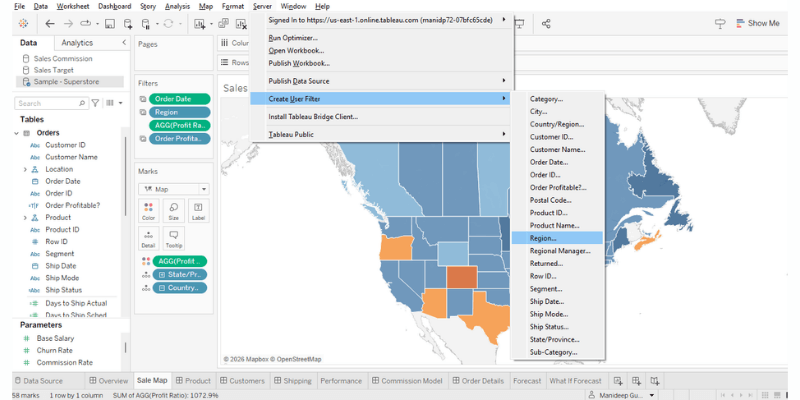
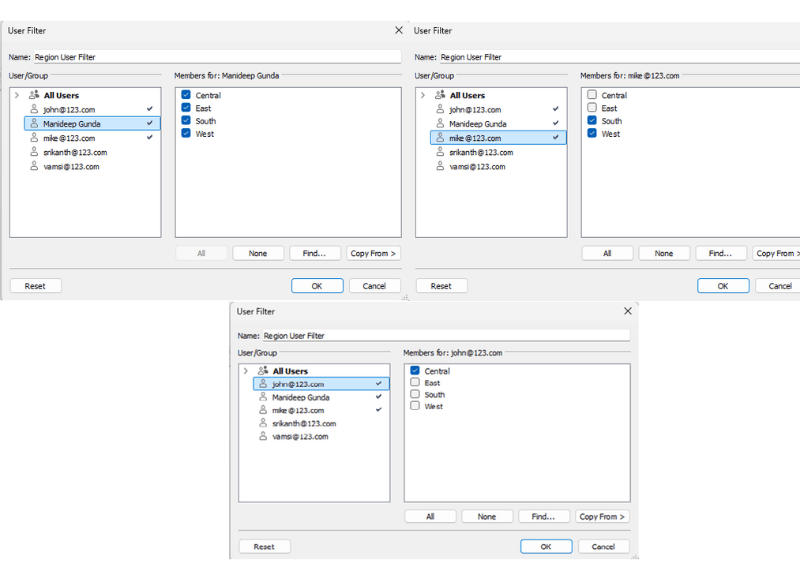
From there, you manually map users to values:
- John 🡪 Central Region
- Mike 🡪 South and West Region
- Manideep 🡪 All Regions
Creating the User Filter automatically generates a set in Tableau. Add it to the Filters pane to enforce user-based filtering. By default, Tableau applies it as a context filter, ensuring it is evaluated before any other filters.
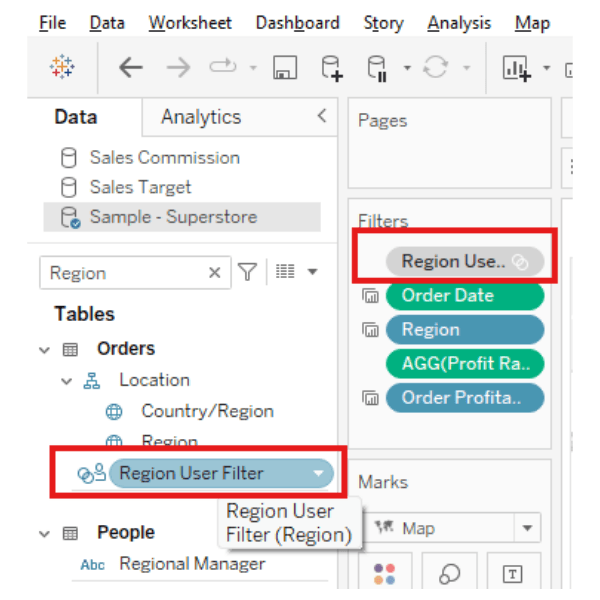
Once this is set, Tableau automatically ensures that:
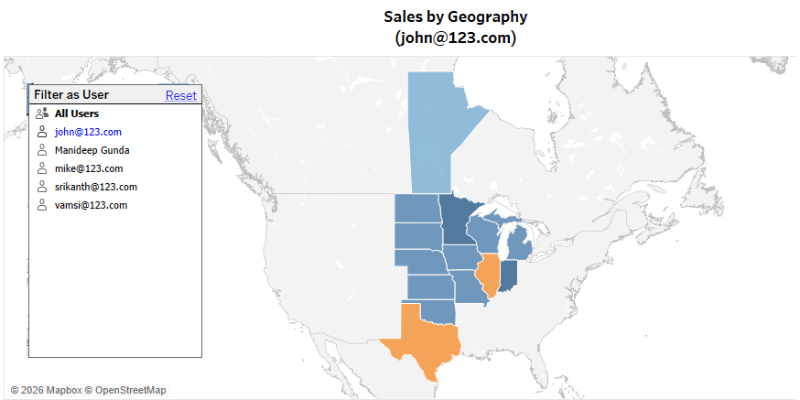
- When John logs in, he only sees Central Region
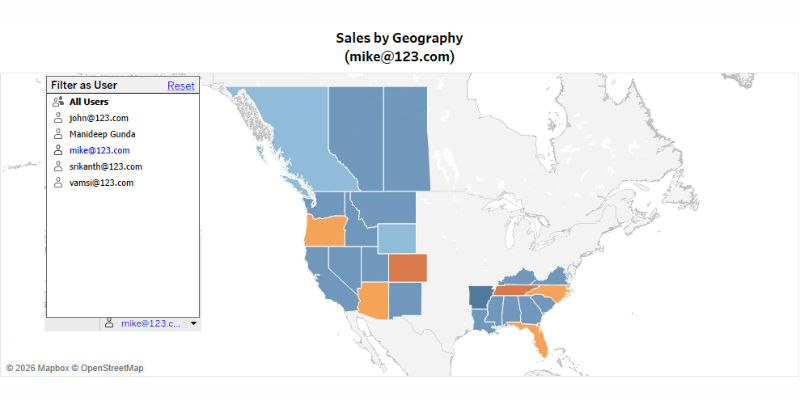
- When Mike logs in, he only sees South and West Region
- When Manideep logs in, he sees all regions.
There’s no need to write calculations or modify dashboards, it’s handled at the data source level.
Validating Using User Emulator (Very Important Step)
This is where Tableau gives you a very practical feature – the ability to simulate another user.
Instead of publishing and testing manually, you can:
- Switch to “View as User”
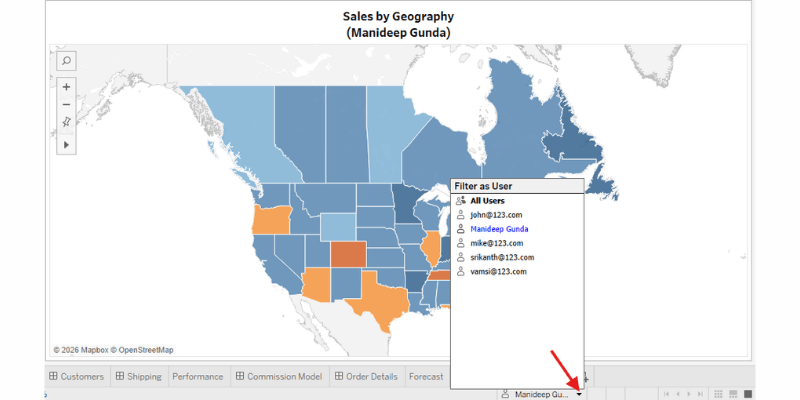
- Select John → See Central data
- Switch to Mike → See South and West data
This step is often overlooked, but in practice, it’s how you validate your RLS before sharing dashboards.
Where This Approach Feels Natural
This method works really well when things are simple.
If each user belongs to:
- One region
- One department
- One fixed category
Then User Filters are quick, clean, and perfectly sufficient.
Where Things Start Getting Real
But real-world data rarely stays this simple.
Soon, requirements start evolving:
- Access depends on Region + Product
- Users change roles frequently
At this point, managing everything inside Tableau UI becomes:
- Hard to scale
- Hard to maintain
- Easy to break
And that’s when most teams naturally move to the next approach.
Moving to a Hybrid Approach: Security Table
Instead of defining access inside Tableau manually, we shift the logic into data itself.
This is where the idea of a security (entitlement) table comes in.
What Changes Conceptually
Earlier, Tableau was deciding:
“John can see Central”
Now, the data itself says:
“John has access to Central and East for Product Category Furniture”
What the Data Model Looks Like
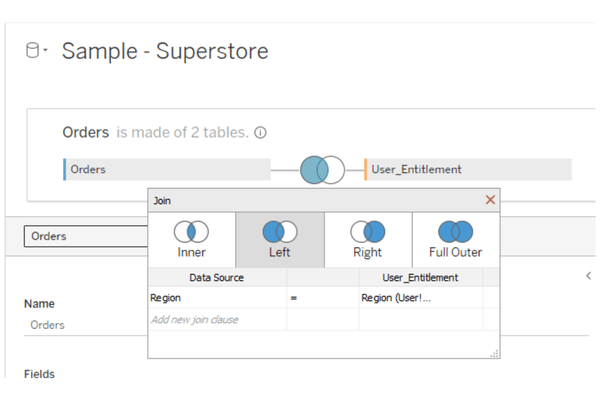
You now bring in two tables:
- Orders (fact table)
- User_Entitlements (security table)
And define relationships on Region
How Filtering Happens Now
Instead of using User Filters, we create a small, calculated field:
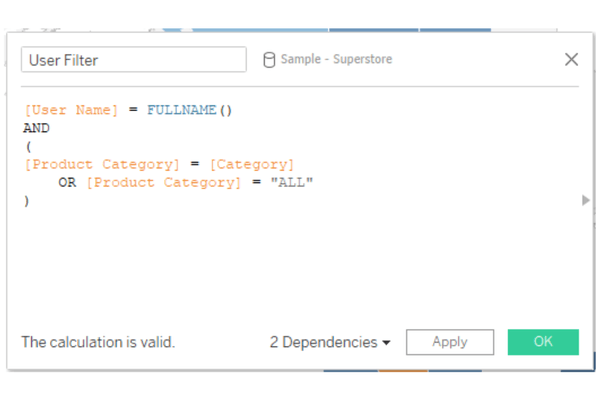
This field simply checks:
“Does this row belong to the logged-in user and the product categories allowed?”
Once applied as a context filter:
Tableau dynamically filters rows using the security table
What This Looks Like in Practice
Let’s say your security table contains:
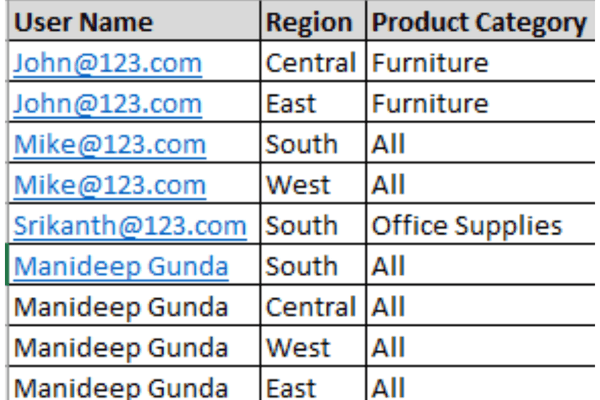
Now when Mike logs in:
- Tableau doesn’t rely on UI mappings
- It reads from the table
- Returns only those combinations
Why Teams Prefer This in Real Projects
This approach feels much closer to how real systems behave.
Instead of changing dashboards:
- You update a table
Instead of hardcoding rules:
- You manage access as data
It becomes:
- Easier to scale
- Easier to maintain
- Easier to audit
A Quick Reality Check (What You’ll Notice Over Time)
As systems grow, a few patterns start to emerge:
- Security tables get larger
- Joins become heavier
- Debugging becomes slightly more complex
And especially when:
- Multiple dashboards use the same logic
- Multiple tools access the same data
You begin to feel that:
“This logic probably belongs closer to the database”
At this stage, a few things become clear:
- Tableau provides native and intuitive ways to implement RLS
- User Filters are great for quick and simple setups
- Security tables introduce flexibility and scalability
- Validation using “View as User” is critical in both approaches
As data and access requirements continue to grow in complexity, many organizations extend their Row-Level Security strategy beyond Tableau by leveraging platforms like Snowflake. In Part 2, we will explore how Snowflake enforces RLS using policies, how it integrates with Tableau in both Live and Extract modes, and how to design a clean, scalable, enterprise-ready architecture for managing data access.