MCP + Oracle Integration: Connecting AI Agents to Enterprise Business Processes
From AI conversations to controlled business actions
In the recent days, AI has become part of our everyday business conversations. People can ask questions, look for the information, and get help with the tasks. But it gets value when AI needs to go beyond providing an answer and actually help complete a business activity.
For example, a user may ask an AI assistant to check for an order, validate an invoice, raise a request, or get customer information. To complete these tasks, the AI needs a way to interact with the applications where the business data and processes reside.
This is the place where Model Context Protocol (MCP) and Oracle Integration (OIC) both can work together. Here, MCP provides a common way for AI agents to find and use business actions, while OIC can connect those actions to the organization’s existing enterprise applications and processes.
Organizations that already use OIC do not necessarily need to build new integration logic for every AI use case. Existing integrations that perform suitable business actions can be made available to AI agents as tools.
Understanding MCP
MCP provides a way for an AI agent to discover and use available tools. When an OIC integration is exposed as a tool, the agent can use that capability without needing to know the underlying integration logic.
Using MCP, AI applications can discover and use tools they need to access information or perform tasks.
For example, if a user asks: Check my Order Status
The AI can understand that it needs to connect to Check Order Status capability. So, MCP helps the AI to find and use this capability without needing to understand all the technical details or logic behind the application.
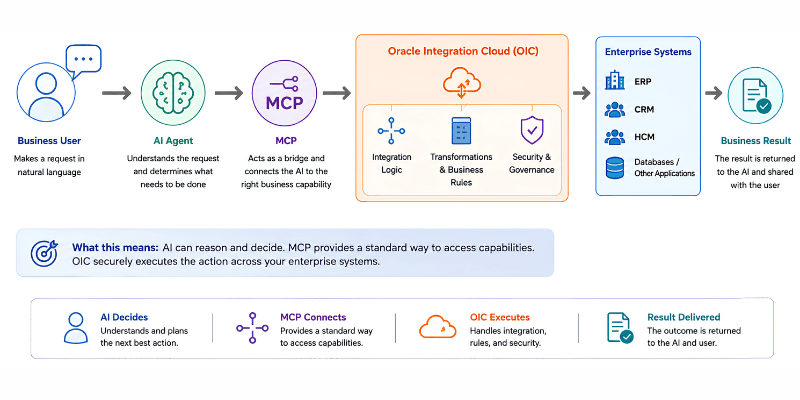
In a simple flow, the AI understands the user request, MCP helps discover and invoke the required business tools, and OIC handles the integration logic needed to connect with the Enterprise application to complete the request.
User Request → AI Agent → OIC AI Tool → Enterprise Application → Result
MCP provides the way for the AI agent to discover and invoke the OIC AI tool.
How Does MCP work with OIC?
Many organizations already use OIC to connect applications and automate business processes. These integrations may support activities such as processing invoices, checking customer or supplier information, processing orders, managing employee data, sending notifications, and applying business rules across different applications.
When organizations begin exploring AI agents, a common question will arise:
Do we need to build everything again for AI?
In many scenarios, the answer is no.
What happens when an existing OIC integration is exposed as an AI tool?
The existing integration can provide a business action that an AI agent can use when needed. This allows organizations to build on what they already have instead of creating a separate integration for every AI use case.
The AI agent focuses on understanding the user’s request and determining what needs to happen. OIC continues to handle application connectivity, integration logic, transformations, and the business processes.
This allows organizations to introduce AI into their existing environment while continuing to use their existing integration capabilities.
From a User Request to a Business Action
Let’s walk through the flow from the user request to the OIC execution.
User: Check the status of item 123
Step 1: User makes a request
The user wants to know the status of an item and asks the AI to retrieve it.
Step 2: AI understands the request
The AI agent understands that it needs item status information.
Step 3: AI selects the appropriate tool
The AI identifies the OIC integration exposed as the appropriate AI tool.
Step 4: OIC performs the action
The OIC executes the integration, connects to the relevant application, and retrieves the information.
Step 5: Result is returned
Once the OIC action is completed, the result is returned to the AI and presented to the user.
AI determines what needs to happen, while OIC helps make sure the required action is carried out through the appropriate business process.
Which OIC Integrations Can be used?
Not every OIC integration needs to be used by AI. Integrations that handle user-driven requests and perform specific business actions are suitable to use as AI tools.
Scheduled integrations, on the other hand, are used for tasks that run automatically based on a schedule and can continue to work in the same way.
In simple words, AI can use OIC tools when users make requests, while scheduled integrations continue to run automatically in the background. Both can support the organization’s automation strategy.
Managing AI Access
As more AI agents use enterprise tools, organizations also need controls over which tools can be accessed, how they are secured, and how they are used. MCP Gateway can provide an additional governance layer for MCP-based access.
How MCP and OIC help Businesses
MCP + OIC can help organizations make existing business actions available to AI while continuing to use their existing OIC integrations and controls.
- Reuse Existing OIC Integrations
Organizations do not necessarily need to build new Integrations for every AI use case. Existing integrations can be made available as reusable capabilities for AI agents.
This allows organizations to build on their existing integration investments instead of creating separate connection for each AI use case. - Give AI Access to specific Business Actions
AI can be given access to the specific business actions it needs to perform a task.
For example, an AI agent may need to check an order status, check supplier details, get invoice details, check customer information, or create an order.
This approach allows organizations to provide access to specific capabilities instead of giving AI direct access to backend applications. - Keep enterprise execution in OIC
Connectivity, transformations, business logic, and other integration related responsibilities remain within OIC.
Use Cases
Procurement request: AI agents can help employees initiate procurement activities through a simple conversation.
- For Example, A user could ask: Create a purchase requisition for these items.
- The AI agent understands the request and identifies the information needed to create the requisition, such as the items, quantities, required date, and delivery location.
- Through MCP, the AI can access the appropriate business action. OIC can then handle the required validations, apply the organization’s procurement rules, and create the purchase requisition in the procurement or ERP system.
- If some information is missing, the AI can ask the user for the required details before continuing.
- The process can also include approval when required. For example, a requisition above a certain amount may need to be reviewed and approved by a manager before it can proceed.
- This provides employees with a simpler way to start a procurement request while allowing OIC to continue handling the business process, validations, integrations, and controls behind the scenes.
- The AI is helping the user initiate the request, while OIC continues to perform the business process.
Human-in-the-Loop — Keeping human in Control
- AI does not need to complete every action without human involvement. For low-risk requests, the AI can complete the action directly. For higher-risk actions, the AI can prepare the request and wait for human approval before OIC executes it.
- The goal is not to remove people from the process. It is to use AI where automation is appropriate while keeping human judgment where it matters most, such as financial approvals or other important decisions.
A Practical Approach to MCP with OIC
Organizations can start their MCP journey by looking at their existing OIC integrations and identifying business actions where AI can provide value.
A simple approach is:
- Identify: Understand the business processes and find areas where AI could improve the user experience or reduce manual effort.
- Assess: Review existing OIC integrations and identify which integrations could be made available to AI agents.
- Design: Plan how the AI agent, MCP and OIC will work together.
- Expose: Make the appropriate OIC integrations available as MCP tools.
- Govern: Apply the required security, access controls, business policies, monitoring, auditability, human approvals, and exception handling.
- Optimize: Once the solution is working, identify additional business actions that can be safely and effectively made available to AI.
Conclusion
MCP provides a way for AI agents to connect with business tools and capabilities, while OIC provides the connectivity and integration logic needed to work with enterprise applications.
For organizations already using OIC, MCP creates an opportunity to bring their existing integrations into the world of AI without having to rebuild them from scratch.