Data Augmentation in Oracle Fusion Data Intelligence (FDI): Turning Standard Data into Business-Ready Insights
Organizations today generate vast amounts of transactional data through their enterprise applications. While Oracle Fusion Applications provide rich operational data, every business has unique reporting requirements, KPIs, and analytical needs that go beyond standard out-of-the-box metrics. This is where Oracle FDI offers two vital features: Data Augmentation and Data Augmentation Scripts (DAS). While they sound remarkably similar, they serve entirely different purposes in your data evolution journey. Let’s dive into how they work and how they transform raw data into tailored business intelligence.

Data Augmentation
Imagine you are looking at a standard Oracle FDI dashboard for global procurement. The charts perfectly map out supplier spend and regional purchasing trends. However, your team recently added custom descriptive flex fields (DFFs) to track sustainability scores for each supplier—a metric critical to your corporate mission. Because this field is unique to your business, the standard FDI pipeline doesn’t automatically ingest it. Hold onto this procurement dashboard — it is the simplest way to see where Data Augmentation ends and Data Augmentation Scripts begin.
This is where Data Augmentation comes into play. In Oracle FDI, Data Augmentation is a built-in, user-friendly framework that allows you to extend the standard data model. It acts as a wizard-driven bridge, enabling data engineers and analysts to extract additional data—such as custom descriptive flex fields (DFFs), extensible flex fields (EFFs), or entirely new tables from Oracle Fusion Cloud applications—and seamlessly incorporate them into the FDI data lake house. In procurement terms, that is how the sustainability score reaches the spend dashboard: one source object, one additional attribute, landed as-is.
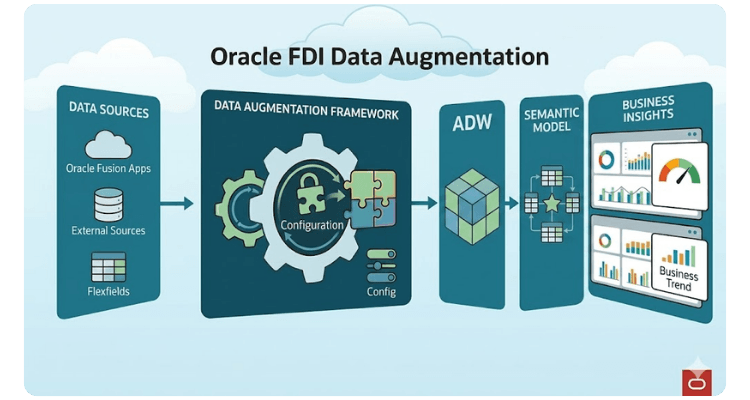
What Problem Does Data Augmentation Solve?
Without Data Augmentation, a business is trapped in a generic analytical ecosystem. It ensures that your dashboards aren’t just reflecting a business model, but your business model. By augmenting the standard pillars with your specific operational data, you eliminate blind spots, ensure data continuity, and allow leaders to make decisions based on the complete organizational picture.
Beyond the Standard Model: Enriching Oracle FDI with Data Augmentation Scripts (DAS)
As your business grows, so does the complexity of your data. Standard reporting tools cover common use cases well, but there are scenarios where you need to combine information from multiple Entities, apply custom business logic, or handle data that doesn’t fit neatly into pre-built templates.
DA Scripts bridge this gap. They allow technical teams to build tailored data pipelines — without replacing or disrupting your existing Oracle FDI setup — so business users get the right data, in the right format, at the right time.
It represents the programmatic, code-driven layer of data enhancement within FDI. Instead of relying solely on the standard graphical interface, DAS allows technical teams to write, deploy, and maintain customizations to control exactly how data is manipulated, transformed, and augmented during the data loading process.
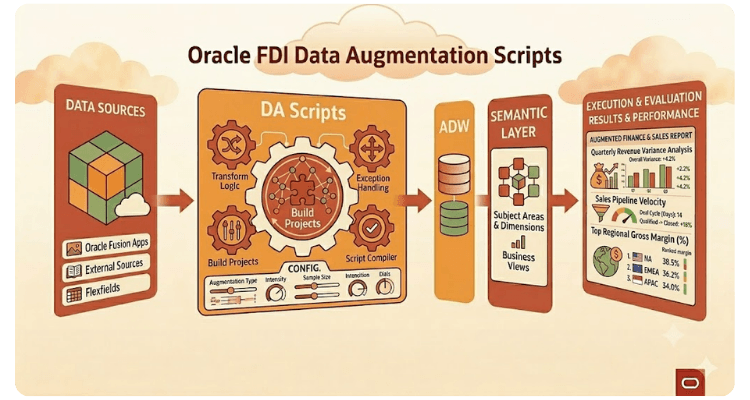
What Problem Does DA Scripts Solve?
In enterprise-grade implementations, automation, speed, and precision are everything. DAS is required when your data enhancement logic is too complex for standard configurations. It gives data teams the granular control needed to execute complex data cleansing, merge disparate data entities with advanced joining logic, and automate repeatable deployments. It transitions your data engineering team from manual configurations to automated, code-driven data management.
A Practical Distinction:
Let’s Say we have order management dashboard. It already shows order status, amounts, credit hold reason, and hold dates pulled straight from OOTB subject areas, and it works well for day-to-day order tracking. The gap shows up when the team needs something OOTB doesn’t carry, and later, when Business wants a view that OOTB was never designed to answer in the first place. The first is a missing attribute — a piece of information that simply isn’t part of any standard subject area. The second is a missing business view — a question that can’t be answered by any single subject area at all, no matter how many fields you add, because it depends on combining multiple entities and applying rules across them. These two gaps call for two very different tools.
With Data Augmentation, the team uses the no-code wizard to bring in one extra Fusion attribute that isn’t part of any standard subject area: the customer’s internal collections-risk segment, captured as a descriptive flex field during customer onboarding. The field arrives in FDI exactly as it exists in Fusion. An order on credit hold can now be viewed alongside that risk segment. There are no multiple entities, complex logic, or calculated measures involved. It is simply a 1-to-1 extension.
Then the question changes. Leadership no longer wants to look at one order at a time. They want to know how much booked revenue is stuck across the business because of credit holds, how long it has been stuck, and which customers are repeat risks.
That answer does not live in a single flex field. It requires order headers, order lines, customer master data, and credit hold history to be blended together, then shaped by business rules:
- Days on hold, calculated from hold start date versus current date (or release date, if released)
- Revenue at risk, aggregated from booked order value for every order currently on hold
- A repeat-offender flag, for example only when a customer has had three or more holds in a rolling 90-day window
- A single customer identity, even when the same customer places orders under different business units or ship-to accounts
None of that is a straight copy of a source field. It is many-to-one mapping, derived metrics, and aggregation logic. The DA wizard cannot do it while Data Augmentation Scripts can.
That is the practical distinction. Data Augmentation brings an attribute OOTB doesn’t carry onto the individual order. DAS builds the custom view that turns scattered holds into a single picture of revenue at risk.
Data Augmentation Scripts Workflow:
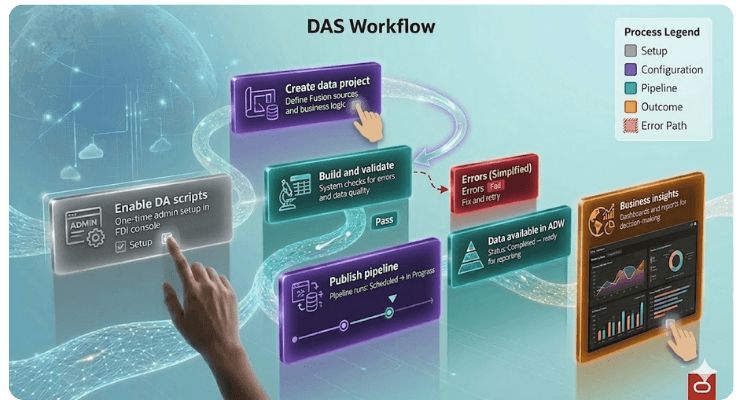
Data Augmentation vs. Data Augmentation Scripts: Choosing the Right Path for Data Enrichment
While both capabilities aim to enrich your data, they cater to different operational needs. Think of it as the difference between creating a dashboard using prebuilt visualizations and developing a custom analytics solution. The procurement story is that same choice: adding the sustainability score is the Data Augmentation path; building a preferred-supplier dataset is the DAS path.
| Strategic Decision Metric | Standard Data Augmentation | Advanced Script-Based Augmentation |
|---|---|---|
| Primary Business Purpose | Quick, straightforward extensions of a single data entity. | Deep, multiple data entities and complex business logic modelling. |
| Ideal Target User | Business Analysts, Functional Administrators | Data Engineers, Enterprise Architects, and Technical Developers. |
| Technical Interface | No-Code: A visual, point-and-click wizard built into the user interface. | Code-Driven: A backend development editor utilizing programmatic scripts. |
| Data Extraction Scope | 1-to-1 Mapping: Pulls from a single source object at a time. | Many-to-1 Mapping: Extracts, blends, and links multiple distinct source objects simultaneously. |
| Transformation Power | Passive: Transfers data exactly as it exists in the core system with minimal changes. | Active: Allows to use Advanced functions, cross-references missing values, and recalculates fields on the fly. |
| Governance & Cleanliness | Relies entirely on the pre-existing structure of the source application. | Acts as a digital gatekeeper, screening out messy data and forcing unique records using strict key logic. |
| Speed to Deployment | Minutes—ideal for immediate tactical adjustments. | Higher development time—built for permanent, enterprise-grade scalability. |
Conclusion:
The true power of Oracle FDI lies not only in its prebuilt analytics capabilities but also in its ability to adapt to evolving business needs. Data Augmentation helps organizations quickly enrich their data, while Data Augmentation Scripts (DAS) provide the flexibility to implement sophisticated business logic and large-scale transformations. Returning to procurement: use Data Augmentation when the sustainability score simply needs to appear on the spend dashboard; use DAS when you need a preferred-supplier view that only exists after several Fusion objects and a set of business rules have been combined. Together, they help businesses turn raw data into actionable intelligence, ensuring decision makers have the insights they need to navigate an increasingly complex business landscape.
Reference: