Managing Item Costs Across Cost Organizations in Oracle Fusion Cloud
In Oracle Cloud, item costs are maintained at the Cost Organization level. All inventory organizations under a single cost organization share the same cost for an item, eliminating the need to replicate costs for each individual inventory organization. However, businesses often update or create new costs for inventory items, and these changes need to be synchronized across multiple cost organizations. To address this challenge, a custom solution was developed to copy item costs from one cost organization to another.
This program significantly reduces manual effort and ensures cost consistency across cost organizations, streamlining operations and improving accuracy.
We developed a comprehensive solution leveraging Oracle Integration Cloud, Oracle BI Publisher reports, REST APIs, and FBDI to execute the complete process of copying item costs from one Cost Organization to another.
| Acronym | Description |
|---|---|
| ERP | Enterprise Resource Planning |
| CRM | Customer Relationship Management |
| SCM | Supply Chain Management |
| HRMS | Human Resource Management System |
| BI | Business Intelligence |
| AI | Artificial Intelligence |
| ML | Machine Learning |
| IoT | Internet of Things |
What is Item Cost
In Oracle Fusion Cost Management, Item Cost is the monetary value assigned to a unit of inventory, representing the cash or equivalent spent to acquire or produce it, calculated and tracked by specific costing methods (like Standard, Average, FIFO) within a chosen cost organization and book, encompassing materials, overheads, and other elements to provide a transparent valuation for financial reporting and decision-making.
Why Copying Item Cost is not straightforward
- Each Cost Organization can have a distinct set of items.
- In Oracle Fusion, migrating all item costs from one Cost Organization to another cannot be accomplished using a single method.
- There is no built-in option to compare costs across different Cost Organizations.
Our Solution Strategy
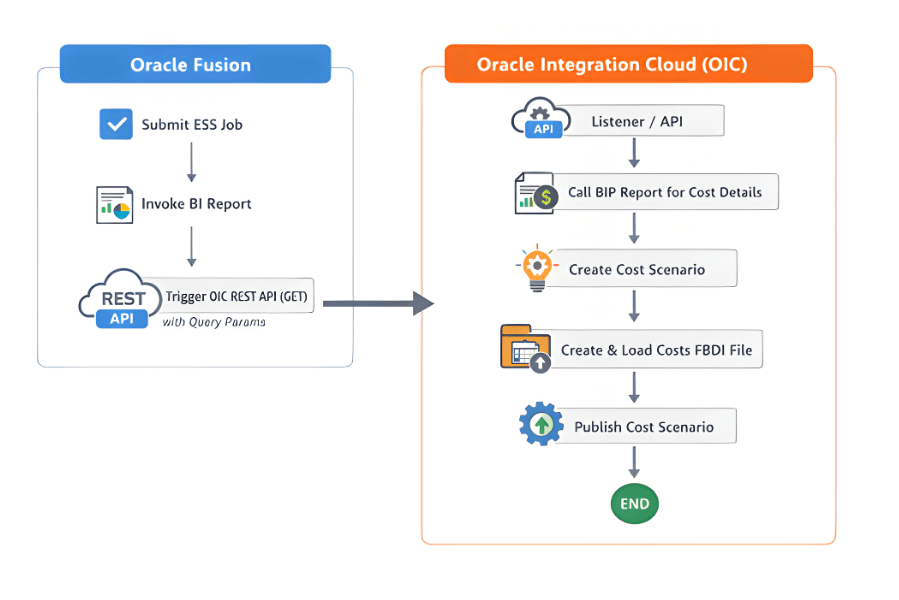
Step 1: ESS Job to trigger the Copy Cost
- Create An ESS job to allow users to submit requests to copy costs between Cost Organizations.
- The ESS job invokes a BI Publisher report configured with an HTTP (XML Feed), which triggers the OIC integration and passes the specified parameters. From this point onward, the OIC integration process begins.
Step 2: Call the BIP report to get the required Cost details
- The Oracle Integration Cloud (OIC) integration is designed to invoke the BI Publisher (BIP) report, which performs a comparison of item costs between the source and destination Cost Organizations.
- If a cost discrepancy is identified, the report returns the source cost along with the corresponding item combination for the destination Cost Organization.
- In cases where the source and destination Cost Organizations belong to different Business Units (BU), the applicable conversion rate is applied to calculate the destination cost accurately.
- If an item cost does not already exist for any item in the destination Cost Organization, the report returns the source cost along with the corresponding item combination for the destination Cost Organization.
The BI Publisher (BIP) report generates three distinct datasets for use in the FBDI load process:
- Header Dataset – Contains high-level details such as Item, Cost Organization, Cost Book, and Cost Scenario information.
- Detail Dataset – Includes cost element details and associated cost values.
- Error Dataset – Captures error information when currency conversion rates are not found.
Step 3: Cost Creation by OIC program
The OIC integration then executes the following sequence of steps.
- Create Cost Scenarios
The OIC integration then invokes REST APIs using the Oracle ERP adapter to create cost scenarios for each destination Cost Organization. - Transform Data for FBDI
Standard cost details retrieved from the BIP report, along with the cost scenarios created via REST API, are transformed into the Standard Cost Import FBDI format. This includes the standard cost header and corresponding cost details. - Generate and Load FBDI File
The [PL3.1] integration packages the data into a zipped file containing header information, detail information and other relevant data. This file is then loaded into Oracle ERP Cloud using the ‘Interface Standard Costs’ ESS job. - Monitor and Publish Cost Scenarios
The integration waits for the FBDI load to complete and subsequently publishes all cost scenarios. - Callback and Status Handling
After processing in Oracle Cloud, OIC receives a callback trigger with the ESS job status and process ID details. - Exception Handling
The integration fetches exception details by passing the process ID to another custom BIP report, which queries any exceptions related to standard costs for the destination Cost Organizations. - Notification
- A status email containing details of failed records is sent to the specified user group via the callback integration.
- If any exceptions occur during execution, OIC sends an email notification to alert stakeholders.
Conclusion
Copying item costs between Cost Organizations in Oracle Fusion Cloud is not a straightforward process. It requires multiple technical components and a clear understanding of the sequence of steps involved in creating item costs. This solution automates the process, eliminating the need for manual effort to synchronize costs for thousands of items, resulting in significant time savings and improved efficiency.